


Most billing problems at a daycare don't start in the billing system. They start six months earlier, when someone approved a sibling discount over email, wrote nothing down, and the front desk "just remembered" to apply it. Then that person left. Then the family's older kid aged out. Then the invoice went out wrong, the parent got annoyed, and now you're issuing a credit and eating an awkward phone call.
Why your discount policy — not your billing software — is the real reason invoices are wrong
The tuition rate isn't the hard part. The rules around the tuition rate are. Sibling stacking, part-time proration, referral credits, promotional rates that were "just for this one family" — these are the things that quietly rot your accounts receivable. And they're almost never a software failure. They're a policy failure that software then faithfully reproduces.
If you want automated billing that actually works, the policy has to be written for a machine first and a human second. Ambiguity is the enemy. Every "it depends" in your daycare tuition policy is a future exception someone has to manually fix.
The pattern behind most billing exceptions
Across a lot of centers, the messy invoices trace back to the same handful of vague rules. Not bad people — vague rules.
Eliminate administrative bottlenecks.
Carexly helps you manage enrollments, attendance, and staff schedules effortlessly.
- Streamlined child enrollment
- Automated parent notifications
- Staff shift and activity scheduling
No credit card required
Here's what "vague" actually looks like in practice:
-
"Siblings get a discount." Okay — is it 10% off the second child, or 10% off the cheaper of the two? Does the infant or the toddler count as "second"? What happens when the older one graduates mid-month?
-
"Part-time is prorated." Prorated how? By day? By half-day? Is a 3-day-a-week kid charged 60% of full-time, or do you have a separate part-time rate that isn't just full-time times a fraction?
-
"Referral bonus for existing families." Does the credit apply when the referred family enrolls, or after they've paid their first month and stuck around? What if they enroll and leave in two weeks?
Every one of these gaps forces a judgment call. And judgment calls don't scale. One admin decides the sibling discount applies to the older child; another applies it to the younger. Six months later you've got two families paying different amounts for the exact same situation, and neither of them knows it — until they compare notes at pickup.
The thing most owners miss: the cost of a fuzzy policy isn't the discount itself. It's the labor and credibility you burn cleaning up after it.
Write rules a spreadsheet could follow
The test for a good tuition rule is simple. Could you hand it to someone who has never met the family and get the same invoice every time? If yes, it's automation-ready. If they'd have to ask you a question, it's not.
> Sibling discount: 15% applied to the lowest base tuition among enrolled siblings. Applies only while two or more children from the same billing account are actively enrolled. Discount ends automatically on the last day of the month in which the second child's enrollment ends.
Notice what that does. It defines which child (lowest tuition), when it starts (two or more active), and when it stops (end of the month enrollment drops). There's nothing left to interpret. A rule written like that can be encoded once and applied forever without anyone thinking about it.
Compare that to "siblings get 15% off," which sounds identical but hides three decisions.
A quick comparison of vague vs. automation-friendly rules
| Discount type | Vague version (creates exceptions) | Automation-friendly version |
|---|---|---|
| Sibling | "Second child gets a discount" | "15% off the lowest base tuition among all actively enrolled siblings on one account" |
| Part-time | "Part-time is cheaper" | "3-day rate = fixed $X; 2-day rate = fixed $Y; no per-day proration" |
| Referral | "Refer a friend, get a credit" | "$100 account credit applied after the referred family completes 30 days enrolled and one full payment" |
| Promo rate | "New family intro pricing" | "10% off months 1–2 only; auto-expires; not stackable with sibling discount" |
The right-hand column isn't more generous or more strict — it's just decided. That's the whole game.
The stacking problem nobody plans for
This is where centers get burned even after tightening each individual rule: they never decide what happens when discounts collide.
A typical example looks like this. A family has two kids, so they qualify for the 15% sibling discount. They also enrolled during a fall promotion, so they've got 10% intro pricing. Somebody referred them, so there's a $100 credit floating around too. Now — do those stack? On the full tuition or the already-discounted amount? Which one applies first?
-
Discounts are not stackable unless explicitly listed as stackable.
-
When two eligible discounts exist, the larger single discount applies — not both.
-
Account credits (like referrals) apply after percentage discounts, as a flat dollar reduction.
If your policy doesn't answer that, your front desk will answer it differently every single time. And parents talk. The moment one family realizes they got a worse stack than their neighbor, you're not defending a policy — you're defending a mistake.
The clean fix is a stacking rule stated once, at the top of the policy: Three sentences. That eliminates probably 80% of the "wait, why is this invoice different" conversations before they happen.
Real scenario: a two-room center drowning in credits
A center with roughly 55 kids across two rooms was issuing manual credits almost every billing cycle — somewhere around 8 to 12 corrections a month. Most were tiny, $30 here, $75 there. But each one meant a parent email, a manual adjustment, and about 15–20 minutes of admin time to figure out what the "right" number should have been.
When they actually audited it, the root cause wasn't the software or the staff. It was that their sibling discount had been verbally described three slightly different ways over two years, and their part-time proration was being calculated by hand — sometimes off the daily rate, sometimes off a flat part-time rate that predated a tuition increase.
They didn't buy anything new. They rewrote the policy so every discount had a defined base, a defined trigger, and a defined end condition, plus one stacking rule. Within two billing cycles, monthly corrections dropped to two or three, and the remaining ones were genuine edge cases — mid-month withdrawals, not ambiguity.
The revenue impact was modest but real. They'd been quietly under-billing on a few stacked discounts that shouldn't have stacked, probably a few hundred dollars a month. The bigger win was admin hours and parent trust. Nobody was getting surprise invoices anymore.
A short process to convert your policy to automation-ready
You don't need a consultant for this. Block two hours and go rule by rule.
Start with the most commonly used discounts so you reduce the largest volume of manual corrections first.
-
List every discount and special rate you currently offer. Include the informal ones. The "we gave the Hendersons a break because of the subsidy gap" arrangements count — those are exactly the ones that break automation.
-
For each one, write the base it applies to. Full tuition? Lowest sibling rate? Weekly rate? If you can't name the base, you can't automate it.
-
Define the trigger. What single, checkable condition turns it on? "Two active enrollments." "First payment completed." "Enrolled before X date."
-
Define the end condition. This is the step everyone skips. When does it stop? Discounts that never expire on paper end up applied forever by accident.
-
Write one stacking rule for the whole policy. Decide it once so you never decide it per-family.
-
Convert dates to something the billing runs on. "End of the month enrollment ends" beats "when the child leaves," because billing cycles are monthly and human departures are messy.
Once your rules pass that test, encoding them into an operational or billing platform becomes almost trivial — because the hard thinking is already done. Automation isn't magic; it just executes decisions you've already made. The reason automated billing feels unreliable at most centers is that it's being asked to execute decisions nobody actually made.
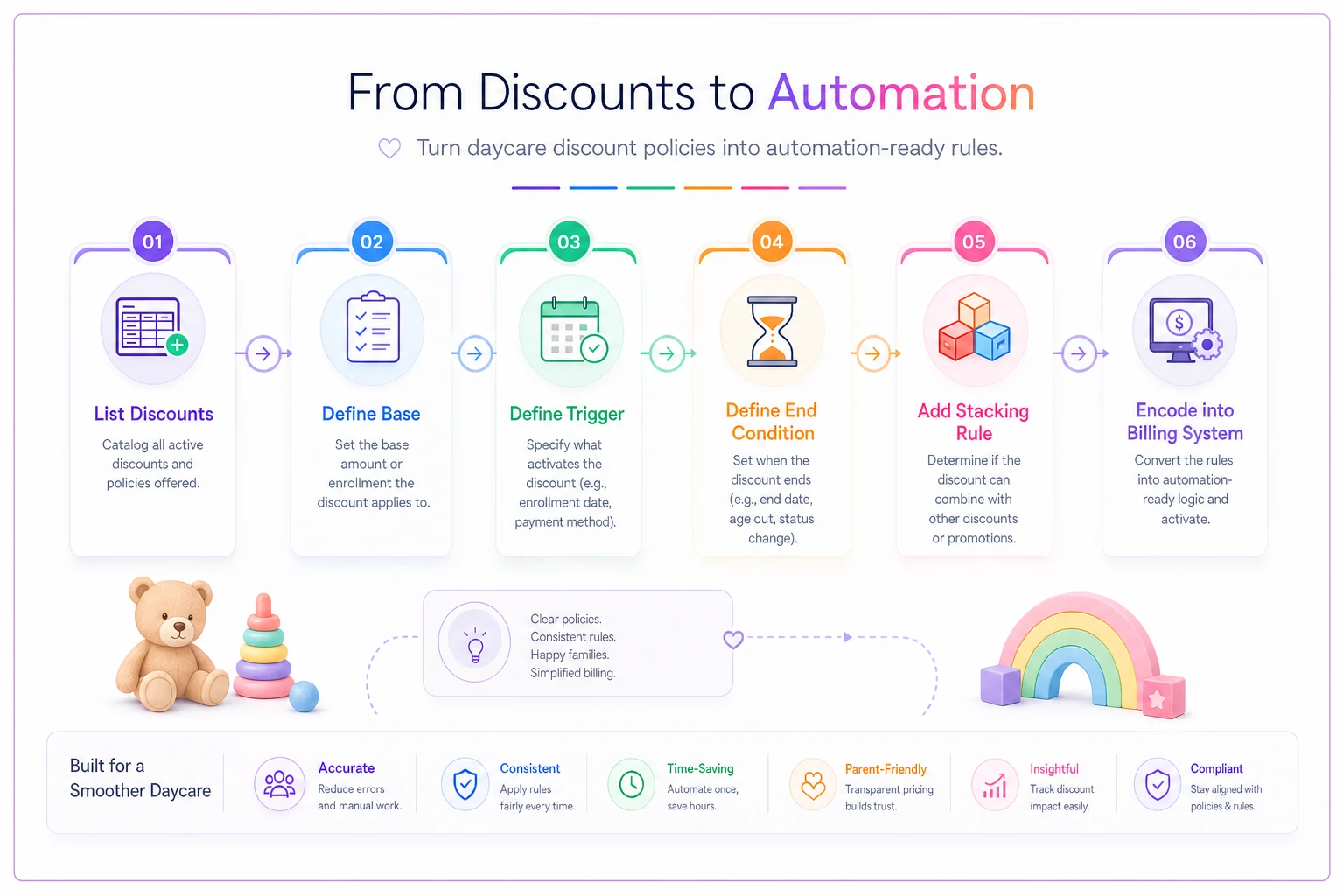
Here's a quick visual of the process.
Where automation genuinely earns its keep
Once the rules are clean, a few things get a lot easier to hand off to your billing or operations software:
-
Auto-expiring discounts. The intro rate that ends after month two shouldn't rely on someone remembering. A system that reads the enrollment date and drops the discount on schedule removes an entire class of errors.
-
Sibling logic that reacts to enrollment changes. When the older child graduates, the discount should recalculate on the correct base without anyone touching it.
-
Referral credits tied to a real trigger. Instead of "apply $100 whenever," the credit fires only after the 30-day, first-payment condition is met.
The point isn't to remove human judgment from your center. It's to remove human judgment from arithmetic that should never have required judgment in the first place. Your team's attention is better spent on families than on reconstructing why an invoice is $42 off.
When a policy-first rewrite makes sense — and when it doesn't
Worth doing if you're running more than about 30 families, offer two or more discount types, or you're issuing manual credits more than a couple times a month. Those are the conditions where ambiguity compounds fastest.
Also worth doing before you open a second location. Two sites running two slightly different interpretations of "sibling discount" is a reconciliation nightmare waiting to happen.
When it's overkill: if you're a small home-based program with a flat rate and no discounts, don't build machinery you don't need. A single rate needs no stacking policy. Adding structure for its own sake is just a different kind of waste.
Who should be careful: centers mid-way through a tuition increase. Rewriting discount rules while base rates are shifting means you're changing two variables at once, and you'll struggle to tell which change caused which billing surprise. Finish the rate change, then clean the policy.
The real takeaway
Billing errors at a daycare almost never come from the billing tool. They come from rules that sounded clear when you said them out loud and turned out to be full of unmade decisions. Sibling, part-time, referral, and promo discounts each hide a base, a trigger, an end date, and a stacking question — and every one you leave undefined becomes a manual correction later.
Tighten the language until a stranger could produce the same invoice you would. Do that, and automation stops being the thing that makes mistakes and starts being the thing that quietly prevents them. Your front desk stops apologizing for surprise charges, your accounts receivable gets predictable, and your daycare tuition policy finally works the way you always assumed it did.
Tighten the language until a stranger could produce the same invoice you would. Do that, and automation stops being the thing that makes mistakes and starts being the thing that quietly prevents them. Your front desk stops apologizing for surprise charges, your accounts receivable gets predictable, and your daycare tuition policy finally works the way you always assumed it did.
Ready to transform your daycare operations?
Join hundreds of daycare centers using Carexly to save time, improve communication, and enhance child care quality.