


Monday morning, 7:14 AM. A parent drops off their toddler and mentions they need to update their emergency contacts. You scribble it on a sticky note. Three minutes later, another parent asks about their account balance. You promise to email them. By 8:30, you've collected fourteen different admin tasks scattered across napkins, your phone notes, and that spiral notebook at the front desk.
This isn't about being disorganized. Each enrollment adds roughly 47 minutes of monthly admin work when you handle tasks as they come up. Enrollment paperwork updates, billing questions, attendance corrections, subsidy documentation, immunization reminders — they trickle in randomly throughout the day. A 60-child center processes around 2,820 minutes of pure admin monthly. That's 47 hours, more than a full work week, just handling the administrative layer.
The interrupt cost makes it worse. When you stop mid-task to answer a billing question, you don't just lose those three minutes. You lose another four minutes getting back into focus. Seven interruptions per hour means you're operating at maybe 40% effectiveness.
Centers that run smoothly don't have fewer admin tasks. They've restructured when and how those tasks get processed.
Why traditional "stay on top of it" advice makes things worse
Most daycare management advice treats admin work like it's predictable. Update records daily. Process billing weekly. Review attendance monthly. Clean advice that completely ignores operational reality.
Real daycare admin looks more chaotic. A parent emails at 11 PM about changing pickup authorization. Another calls during naptime about their tax receipt. The state sends new immunization requirements that need immediate attention. Your bookkeeper needs October's attendance reports but three families haven't confirmed their vacation dates.
The traditional approach — handling everything as it comes in — creates three specific problems.
First, you never get depth on any single task type. Processing one enrollment application, then switching to fix a billing error, then back to updating emergency contacts means you're constantly context-switching. Each task type requires different information, different systems, different mental models. You spend more time transitioning than actually working.
You can't spot patterns either. When you process billing corrections one at a time, you miss that four families have the same confusion about late pickup fees. When you update immunizations individually, you don't notice that half your 3-year-old room needs updates before December.
The work also distributes by availability, not capability. If admin tasks come in randomly, whoever's available handles them. Your highest-paid staff members often end up doing data entry while your admin assistant is filing paperwork.
The batching framework that actually works with unpredictable schedules
Centers that batch their admin work save between 8 and 14 hours weekly. Not through working faster, but through working differently.
Eliminate administrative bottlenecks.
Carexly helps you manage enrollments, attendance, and staff schedules effortlessly.
- Streamlined child enrollment
- Automated parent notifications
- Staff shift and activity scheduling
No credit card required
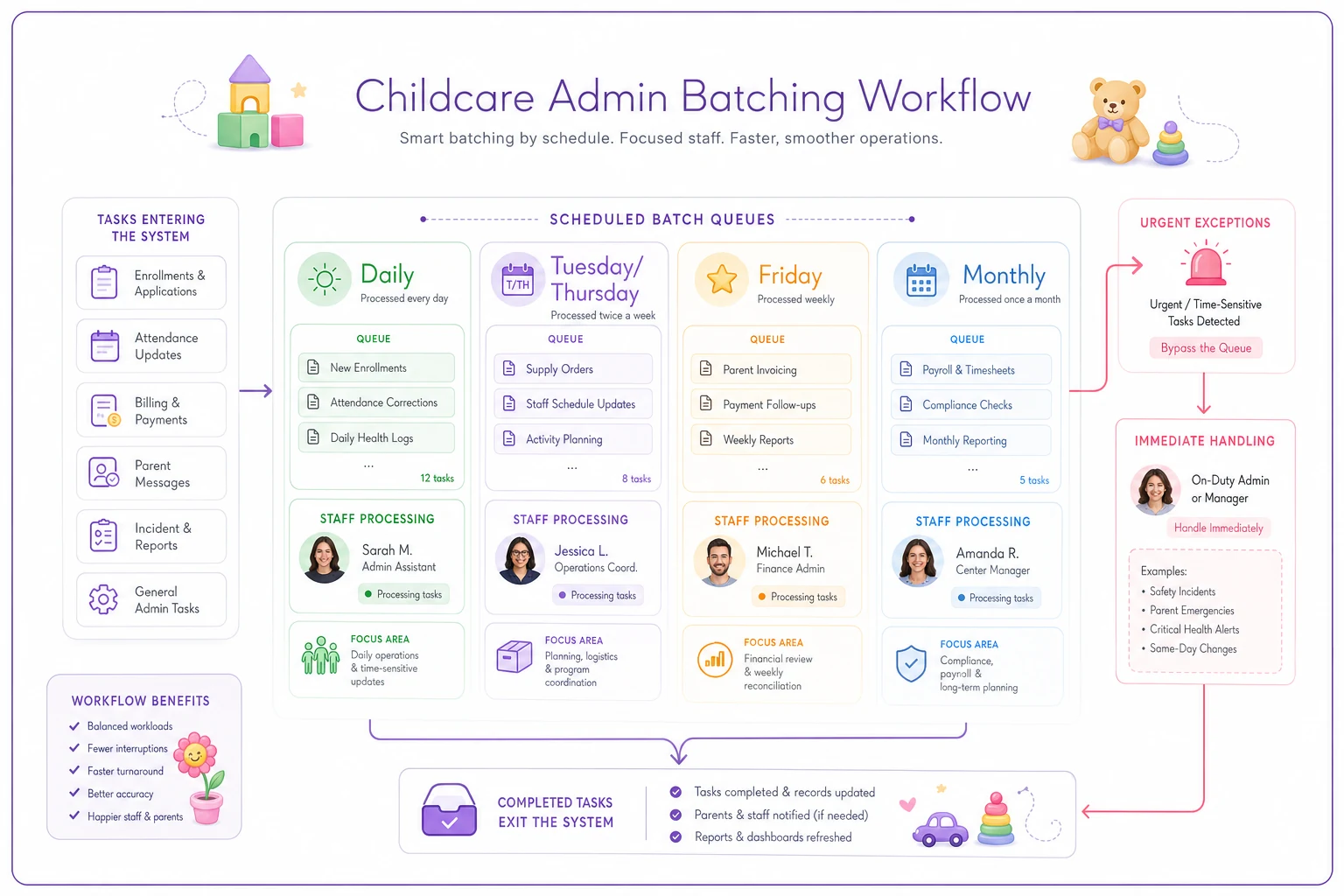
The framework splits admin work into four batch categories:
Daily Batch (15 minutes, 7:30 AM)
-
Attendance discrepancy reviews
-
Sick notification logging
-
Schedule change requests
-
Urgent parent communications
Tuesday/Thursday Batch (90 minutes each)
-
All enrollment paperwork
-
Documentation updates
-
Immunization tracking
-
Emergency contact changes
-
Subsidy paperwork processing
Friday Batch (2 hours)
-
Full week billing review
-
Payment processing
-
Late fee assessments
-
Account reconciliation
-
Next week scheduling conflicts
Monthly Batch (Half day, first Wednesday)
-
Compliance documentation audit
-
Staff certification tracking
-
State reporting prep
-
Waitlist management
-
Contract renewals
The key isn't the specific schedule — it's the containment principle. Admin tasks stay in their designated batch unless they're genuinely urgent. Parent wants to update pickup authorization on Monday? We process all authorization changes on Tuesday. Need your December tax receipt in October? Those generate during our Friday billing batch.
A quick visual of the batching workflow helps teams follow it.
This feels rigid initially, but parents adjust when they understand the tradeoff. Would you rather get an immediate but possibly error-prone response, or a thorough, accurate response within 48 hours? Most choose accuracy.
Six automation recipes with actual time savings
Batching alone cuts admin time by about 35%. Adding targeted automation to your batched workflows pushes that to 60% or more. Here are six specific automations that work with the batching schedule above.
1. Enrollment inquiry to tour booking (saves 6 hours weekly)
Current process: Parent emails asking about openings. You check availability, respond with tour times, exchange three more emails to find a slot, manually add to calendar, send confirmation, then reminder.
-
Parent fills out inquiry form with child age and desired start date
-
System checks current openings and ratio capacity
-
Automatically offers three tour slots based on your availability calendar
-
Parent selects time
-
Confirmation email sends with directions and what to bring
-
Reminder text goes out morning-of
-
Create inquiry form with required fields (child DOB, preferred start date, parent contact)
-
Build availability calendar with blocked times for tours
-
Set up automatic email templates for confirmation and reminders
-
Connect form to calendar system
-
Test with three mock inquiries
Time saved: 20 minutes per inquiry × 18 inquiries weekly = 6 hours
2. Attendance discrepancy alerts (saves 4 hours weekly)
Current process: Manually compare sign-in sheets to scheduled attendance, chase down explanations for mismatches, update billing adjustments, document for state reporting.
-
System compares scheduled vs actual attendance at 10 AM and 4 PM
-
Flags discrepancies over 15 minutes
-
Sends specific alerts
"Emma Chen scheduled 8:00 arrival, signed in 9:45"
-
Auto-generates variance report for billing adjustments
-
Archives documentation for compliance
-
Digitize sign-in/out (tablet, keypad, or QR code)
-
Upload weekly schedules into system
-
Set variance thresholds (typically 15 minutes)
-
Create alert routing (who gets which notifications)
-
Test for one room before full rollout
Time saved: 30 minutes daily × 5 days = 2.5 hours, plus another 1.5 hours on billing reconciliation
3. Immunization expiration tracking (saves 3 hours monthly)
Current process: Manually review each child's records monthly, create lists of upcoming expirations, send individual reminders, track responses, follow up with non-responders, update records when received.
-
System tracks immunization dates from enrollment
-
Sends 60-day warning to parents
-
Sends 30-day urgent notice
-
Sends 7-day compliance warning
-
Alerts director of non-responders
-
Updates records when new documents uploaded
-
Input all current immunization dates into tracking system
-
Set reminder intervals (60, 30, 7 days)
-
Create email templates for each reminder stage
-
Set up document upload portal for parents
-
Create compliance dashboard for directors
Time saved: 3 hours monthly for a 60-child center
4. Billing statement generation with payment links (saves 5 hours monthly)
Current process: Calculate each family's charges, apply credits and adjustments, generate statements, email individually, field questions about charges, process payments, match payments to accounts.
-
System calculates monthly charges based on enrollment and attendance
-
Applies contracted discounts and subsidies
-
Generates itemized statements
-
Emails with secure payment link
-
Processes payments and updates accounts
-
Sends receipts automatically
-
Input all rate structures and discount rules
-
Connect attendance tracking to billing system
-
Set up payment processor integration
-
Create statement template with clear line items
-
Test with dummy accounts before going live
Time saved: 5 minutes per family × 60 families = 5 hours monthly
5. Waitlist communication sequence (saves 8 hours per opening)
Current process: When spot opens, call first waitlist family, wait for response, move to next if no answer, repeat until confirmed, send enrollment packet, track paperwork return, manually remove from waitlist.
-
Opening triggers notification to first waitlist family
-
48-hour response window with yes/no buttons
-
Auto-advances to next family if no response
-
Sends enrollment packet upon acceptance
-
Tracks document completion
-
Removes from waitlist when enrollment complete
-
Build waitlist in priority order with contact preferences
-
Create opening notification template
-
Set response timeline (typically 48 hours)
-
Link enrollment packet to acceptance
-
Create status dashboard for tracking
Time saved: 8 hours per opening × varies by turnover
6. Staff schedule change requests (saves 4 hours weekly)
Current process: Staff texts, calls, or mentions schedule changes. You track on paper, evaluate ratio impacts, approve or deny, communicate decision, update schedule, notify affected rooms.
-
Staff submits change request through form
-
System checks ratio requirements
-
Alerts if change would break compliance
-
Routes to approval based on impact
-
Updates master schedule upon approval
-
Notifies all affected staff
-
Create request form with required fields (date, time, reason)
-
Input ratio requirements by room and age
-
Set approval routing rules
-
Connect to master scheduling system
-
Set up notification groups by room
Time saved: 15 minutes per request × 16 requests weekly = 4 hours
Realistic implementation timeline
Don't attempt all six automations at once. The centers that succeed pick one, implement fully, then add the next. A realistic timeline:
Week 1-2: Implement enrollment inquiry automation. This has the highest parent-facing impact and builds confidence. Week 3-4: Add attendance discrepancy alerts. This immediately reduces daily friction. Week 5-8: Layer in billing automation. Take time here — billing errors erode parent trust quickly. Week 9-10: Add immunization tracking. This runs in the background with minimal daily interaction. Week 11-12: Implement waitlist communication. Lower priority unless you have significant turnover. Week 13+: Add staff scheduling only after other systems are stable.
The math on actual time recovery
Time savings for a 60-child center with 4 administrative staff members:
| Scenario | Daily Admin | Weekly Admin | Monthly Reporting | Crisis Management | Total Weekly Hours |
|---|---|---|---|---|---|
| Before Optimization | 3 hours (scattered) | 8 hours | 3 hours (averaged) | 6 hours | 47 hours |
| After Batching Only | 1.25 hours (focused) | 5 hours | 1 hour (averaged) | 2 hours | 31 hours |
| After Batching + Automation | 0.75 hours | 3 hours | 0.5 hours (averaged) | 1 hour | 19 hours |
That's 28 hours weekly returned to actual childcare operations. At $18/hour, that's $26,208 in annual labor value redirected from paperwork to children.
Who shouldn't do this
This batching and automation approach fails in specific situations.
Centers under 30 children often don't have enough volume to justify batching. The overhead of maintaining batched schedules exceeds the interrupt cost of handling tasks individually.
Centers without consistent leadership shouldn't attempt this. If your director or admin lead changes every six months, you'll constantly restart the implementation.
Centers in their first year should focus on basic operations first. Get your ratios right, establish your culture, stabilize enrollment. Then optimize admin.
Centers with highly irregular schedules (drop-in care, hourly programs) need different solutions. Batching assumes some predictability in workflow volume.
Making it stick when everything fights against it
The hardest part isn't setting up batching or automation — it's maintaining it when operational chaos hits. Three specific strategies help:
Strategy 1: Visible batch scheduling Post your batch schedule where parents can see it. "Documentation updates: Tuesdays & Thursdays. Billing questions: Fridays." When parents understand the system, they self-regulate their requests.
Strategy 2: Overflow protocols Define exactly what breaks the batch. True emergencies: injury documentation, custody changes, compliance violations. Everything else waits. Write this down. Reference it when someone pushes for immediate handling.
Strategy 3: Metrics tracking Track one number weekly: hours spent on admin tasks. Nothing changes behavior like seeing that number drop from 47 to 19. Post it. Celebrate it. Protect it.
The bigger picture on admin efficiency
The real win isn't just time savings — it's what happens when admin work stops infiltrating every moment of your day. Directors spend more time in classrooms. Teachers aren't pulled away for billing questions during circle time. Parents get consistent, accurate responses to their requests.
Most childcare software promises to solve these problems through features. More buttons, more reports, more complexity. But features without workflow design just digitize chaos. You need both the structure (batching) and the tools (automation) working together.
Centers running smoothly haven't eliminated admin work. They've contained it, systematized it, and largely automated the repetitive pieces. Their staff spends time on judgment calls and relationship building, not data entry and paper shuffling.
Start with the Tuesday/Thursday documentation batch. Just that. Run it for two weeks. Feel the difference when documentation tasks stop interrupting your entire day. Then add the next piece.
The path from 47 hours of weekly admin to 19 hours isn't complicated. Pick your batch windows. Implement one automation at a time. Protect the system when things get chaotic. The math is simple — it's the discipline that's hard.
But when you're spending 28 fewer hours weekly on paperwork and 28 more hours on actual childcare, that discipline pays for itself. Your staff stays focused, parents get better service, and you remember why you got into childcare in the first place — to work with children, not spreadsheets.
Ready to transform your daycare operations?
Join hundreds of daycare centers using Carexly to save time, improve communication, and enhance child care quality.