


Buying childcare software is one of those decisions where the demo always looks great and the regret shows up three months later. The software that wowed you in a 45-minute screen share turns out to be missing the state licensing report your inspector wants, or it charges per-child in a way that quietly punishes you for growing, or your lead teacher refuses to touch it because check-in takes six taps instead of one.
This guide is built to prevent that. It won't tell you which brand to pick — your mix of ratios, billing complexity, and reporting requirements is too specific for that. What it gives you is a framework, a comparison template, the right vendor questions, and an implementation plan that'll hold up past the honeymoon period.
Why generic software never quite fits childcare
Plenty of centers try to stitch together a scheduling app, QuickBooks, a group-text tool, and a spreadsheet for immunizations. It works until it doesn't. The breaking point is almost always a compliance moment — a licensing visit where someone asks for a ratio history by room by hour, and you're reconstructing it from memory and a paper sign-in sheet.
Childcare software earns its keep in the places where general tools fall flat:
-
Attendance that ties to ratios in real time, not just a timestamp
-
Tuition billing with subsidy splits, sibling discounts, and part-time schedules that break standard invoicing software
-
Parent communication with photo sharing and daily reports that respect privacy expectations
-
Licensing and health reporting formatted the way your state actually wants it
The question isn't whether you need specialized software. It's which features you genuinely need versus which ones you'll pay for and never open.
Match the software to the kind of operation you run
The biggest buying mistake is purchasing for a center that isn't yours. A single-site family daycare and a nine-location provider have almost nothing in common operationally, yet they often work from the same vendor shortlists.
Eliminate administrative bottlenecks.
Carexly helps you manage enrollments, attendance, and staff schedules effortlessly.
- Streamlined child enrollment
- Automated parent notifications
- Staff shift and activity scheduling
No credit card required
Family-run or single-site center (roughly 15–60 children)
Your priority is simplicity and low admin overhead. You probably don't have a dedicated bookkeeper, so billing automation matters more than deep financial reporting. You want parents using the app without a training session, and you want check-in fast enough that it doesn't bottleneck the 8 a.m. rush.
What to prioritize: easy check-in, automated tuition billing, parent messaging, basic immunization tracking. What to skip: multi-site dashboards, complex role hierarchies, API access you'll never use.
Multi-site provider (3+ locations)
What to prioritize: cross-site reporting, centralized billing rules, role-based permissions, staff scheduling with payroll export, strong data export. What to skip: nothing, really — but watch per-child pricing, which compounds fast at scale.
Watch per-child pricing carefully at scale; it compounds quickly.
Preschool inside a school district or larger org
Your constraint is usually the district's existing systems and its IT and privacy requirements. The software has to coexist with a student information system and clear a procurement and data-privacy review that a standalone daycare never faces.
What to prioritize: data privacy controls, exportability, SSO and integration capability, and documented security practices. If your procurement process has gotten more complicated recently, the breakdown of how the White House AI Executive Order changes what daycare centers must ask software vendors covers the newer compliance questions worth raising.
The prioritized feature checklist
Not every feature deserves equal weight. Use this as your scoring backbone — mark each item required or optional before you watch a single demo, so the sales pitch doesn't quietly rewrite your priorities.
-
Attendance & check-in — kiosk or app check-in, timestamped, ideally tied to live ratio counts
-
Billing & tuition management — recurring invoices, subsidy/third-party splits, discounts, late fees, autopay, failed-payment handling
-
Parent app & communication — messaging, daily reports, photos, document signing, read receipts
-
Staff scheduling & payroll integration — shift building, time clock, export to your payroll provider
-
Ratios & licensing reports — real-time ratio alerts and historical reports in your state's format
-
Health records & immunization tracking — expiration alerts, allergy/medication flags, renewal workflows
-
Security & data privacy controls — role-based access, audit logs, encryption, parent data consent handling
-
API & integrations — connections to accounting, payroll, and any district systems you rely on
One practical rule from real buying cycles: if a feature isn't marked "required" before demos start, treat it as a nice-to-have during negotiation. That's the only way to avoid paying premium-tier pricing for one feature you'll use twice a year.
Build your comparison matrix
Comparing vendors from memory doesn't work — by the third demo they blur together. Put everything in one scored sheet. Copy this structure into a spreadsheet and fill it as you go.
| Feature | Required/Optional | Priority (1–5) | Vendor A | Vendor B | Vendor C | Est. Cost | Contract Term |
|---|---|---|---|---|---|---|---|
| Attendance & check-in | Required | 5 | |||||
| Billing & tuition | Required | 5 | |||||
| Parent app | Required | 4 | |||||
| Staff scheduling | Optional | 3 | |||||
| Ratios & licensing reports | Required | 5 | |||||
| Immunization tracking | Required | 4 | |||||
| Security & privacy | Required | 5 | |||||
| API/integrations | Optional | 2 |
CSV version (paste into a text file, save as .csv, open in Excel or Sheets):
| feature | required_optional | priority | vendor_a | vendor_b | vendor_c | est_cost | contract_term |
|---|---|---|---|---|---|---|---|
| Attendance & check-in | Required | 5 | |||||
| Billing & tuition | Required | 5 | |||||
| Parent app | Required | 4 | |||||
| Staff scheduling | Optional | 3 | |||||
| Ratios & licensing reports | Required | 5 | |||||
| Immunization tracking | Required | 4 | |||||
| Security & privacy | Required | 5 | |||||
| API/integrations | Optional | 2 |
Score each vendor 1–5 per feature, then multiply by priority for a weighted total. The highest raw score rarely wins — the highest weighted score usually does, because it reflects what actually matters to your center.
The 10 questions that separate good vendors from demos
Demos are rehearsed. Direct questions aren't. Ask these, and write down the exact answers:
-
What's your support SLA and response time during a billing-run emergency? (Not "we have great support" — actual hours and response windows.)
-
What was your uptime over the last 12 months, and do you publish a status page?
-
Who owns the data — and can I export everything, including photos and historical reports, if I leave?
-
In what format does data export, and is there a fee to extract it?
-
What does onboarding include, and is training live or self-serve?
-
Can you show me the exact licensing report my state requires, with real sample data?
-
How are parent data and child photos stored, encrypted, and consented to? (Relevant for COPPA considerations in any parent-facing app.)
-
What's your true total cost — setup fees, payment processing rates, per-site or per-child charges, SMS costs?
-
What happens to our pricing at renewal, and is there an annual increase cap?
-
Can you build me a short demo task? Give them a scenario — "enroll a part-time child with a subsidy split and a sibling discount, then generate this month's invoice" — and watch them do it live.
Question 10 is the one that reveals the most. If a vendor stumbles building a realistic enrollment and billing flow in front of you, your staff will stumble with it too.
A rolling 90-day implementation timeline
Most failed rollouts aren't software failures — they're sequencing failures. Centers try to launch billing, parent apps, and scheduling all at once in September and burn out their staff. Stage it instead.
A simple rollout workflow looks like this.
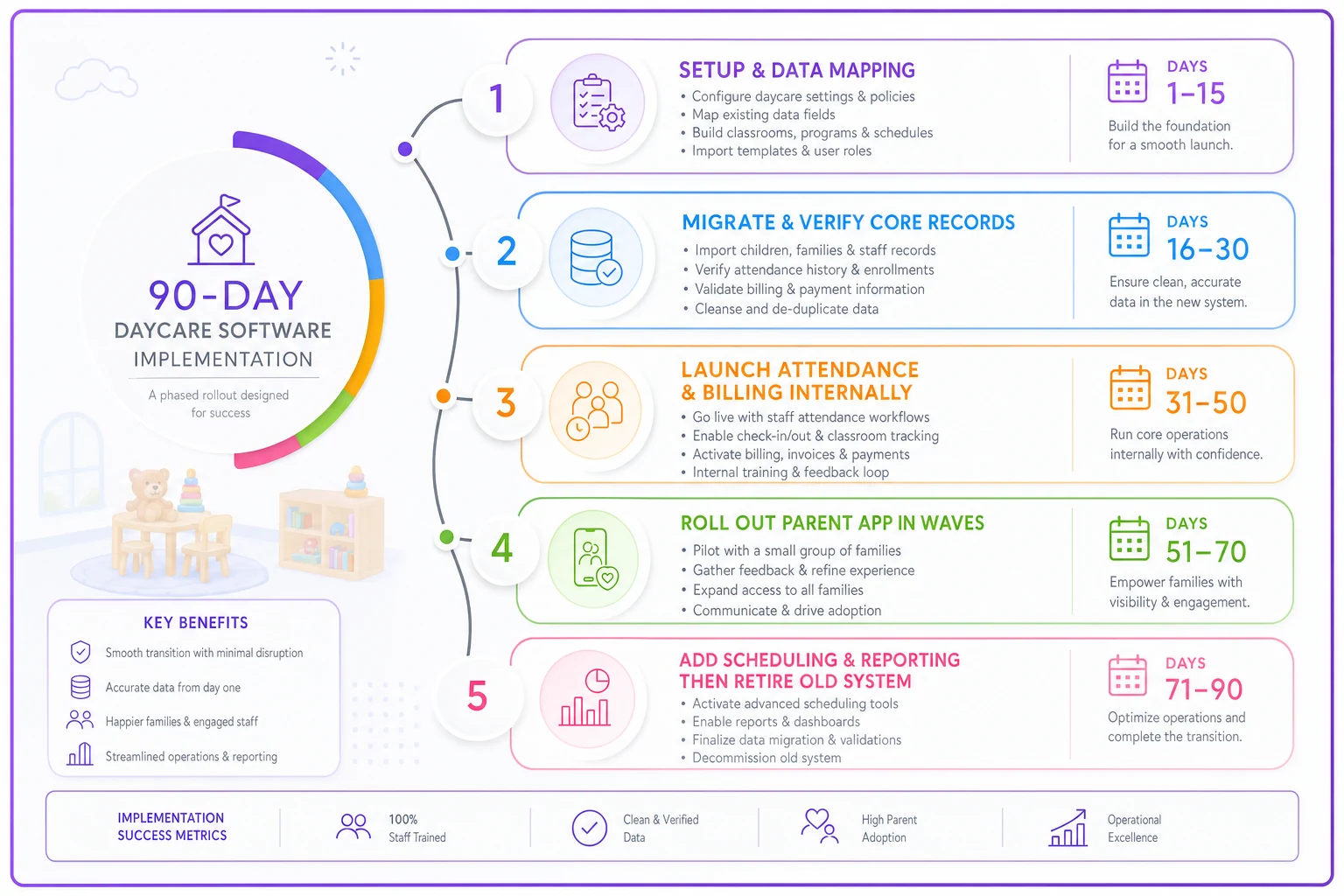
Follow these stages:
Days 1–15 — Setup and data mapping. Lock down your account structure, rooms, ratios, and user roles. Map your existing data fields to the new system before importing anything.
Days 16–30 — Migrate and verify core records. Import children, families, and enrollment. Reconcile outstanding balances line by line — this is where migrations quietly break.
Days 31–50 — Launch attendance and billing internally. Run check-in and one full billing cycle in parallel with your old process. Don't skip the parallel run.
Days 51–70 — Roll out the parent app. Onboard families in waves, not all at once. Start with your most engaged parents — they'll surface issues without making it a big deal.
Days 71–90 — Add scheduling and reporting, then retire the old system. Only cut over once a full billing cycle has reconciled cleanly.
-
Balances that don't reconcile. Outstanding tuition, credits, and subsidy adjustments rarely map cleanly. Reconcile manually.
-
Lost immunization dates. Expiration fields often don't transfer in the same format — verify a sample of 15–20 records by hand.
-
Duplicate family records when a child has two households. Decide your rule before import.
-
Autopay re-authorization. Parents frequently have to re-enter payment info; plan the communication so your receivables don't stall for two weeks.
Migration pitfalls that bite centers
A simple ROI example and the costs nobody quotes you
A mid-size center with around 85 children was spending roughly 10–12 admin hours a week on manual invoicing, payment follow-up, and attendance reconciliation. After moving to automated billing and digital check-in, that dropped to around 3–4 hours a week. At a loaded admin rate near $22/hour, that's somewhere in the $7k–$9k range annually in recovered time — before counting fewer billing errors and faster payment collection.
-
Payment processing fees — a 2.9% + $0.30 rate on autopay adds up fast on tuition-sized transactions
-
Per-child vs per-site licensing — per-child looks cheap at 30 kids and expensive at 150
-
SMS/text charges billed separately from the base plan
-
Setup and data migration fees, sometimes several hundred to a few thousand dollars
-
Overage charges for storage or extra staff logins
Ask for a one-page total-cost estimate at your actual enrollment, not the demo tier.
A data security and compliance primer (not legal advice)
Childcare software holds some of the most sensitive data a small business touches — children's health records, photos, home addresses, and payment details. Vendor security deserves real scrutiny, not a quick checkbox.
-
Encryption in transit and at rest
-
Role-based access so a part-time floater can't see financial records
-
Audit logs showing who viewed or changed records
-
Parental consent handling for photos and data, especially in any app used by families (the area where COPPA considerations come up)
-
Clear data ownership — you should own your data and be able to leave with it
State licensing reporting requirements vary widely, and this isn't legal advice — confirm your specifics with your state licensing authority and, for data privacy obligations, authoritative sources like the FTC's COPPA guidance. If your procurement now includes AI-related vendor questions, the executive order breakdown is worth reading alongside this guide.
Your first six months post-purchase
Buying the software is the easy part. Adoption is where ROI lives or dies. Work through this checklist across the first six months:
-
Month 1 Train staff in small groups; designate one internal "power user" per site
-
Month 2 Onboard parents in waves; track app activation rate (aim for 80%+)
-
Month 3 Run your first clean full billing cycle in the new system only
-
Month 4 Pull your first licensing/ratio report and confirm it satisfies your inspector's format
-
Month 5 Review autopay adoption and chase stragglers; measure days-to-collect
-
Month 6 Audit what you're paying for versus actually using, and renegotiate anything idle before renewal
KPIs worth tracking from the start: parent app activation rate, on-time payment percentage, admin hours per week, and ratio-alert response time. If a number isn't moving by month three, that's a training problem — and better to solve it then than at renewal.
Recommended next steps
Don't book five demos cold. Do this in order:
-
Fill out the feature checklist and mark required vs optional before talking to anyone.
-
Build your shortlist to three vendors max using the comparison matrix.
-
Run the 10-question interview and the live demo task with each.
-
Request a total-cost estimate at your real enrollment number.
-
Pick one, and stage the 90-day rollout — don't big-bang it.
The right system isn't the one with the most features. It's the one that fits how your center actually runs, exports your data cleanly if you ever leave, and gets your staff and parents using it without a fight. Score it, interview it, migrate carefully, and the decision that usually causes buyer's remorse becomes one you barely think about.
The right system isn't the one with the most features. It's the one that fits how your center actually runs, exports your data cleanly if you ever leave, and gets your staff and parents using it without a fight. Score it, interview it, migrate carefully, and the decision that usually causes buyer's remorse becomes one you barely think about.
Ready to transform your daycare operations?
Join hundreds of daycare centers using Carexly to save time, improve communication, and enhance child care quality.