


Most centers don't fail an immunization check because a child is actually unvaccinated. They fail because a record expired three weeks ago, nobody caught it, and the surveyor pulled that exact file. The shot was due, the parent meant to bring the updated card, and now you're writing a plan of correction over something completely preventable.
That gap—between "the record is technically out of date" and "we noticed before it mattered"—is the whole problem. And it's almost always a timing issue, not a documentation one.
This post is about closing that gap with a renewal workflow built around 90/60/30 triggers, scheduled verification, reminder wording that actually gets parents to act, and a director pre-inspection check you can run in under an hour. The goal is a standing immunization audit roster for your daycare that's ready any day someone walks in, not a frantic Friday-night file pull.
Why the roster goes stale (and why it's invisible until inspection)
Immunization records don't expire on a single predictable date like a driver's license. They age in uneven chunks. A 2-month-old is due for a round of shots, then again at 4 months, 6 months, 12–15 months, and so on. Then there's the annual flu dose in some states, plus kindergarten-entry boosters.
The "due dates" on any given child are moving targets that depend on the child's birthday and their last recorded dose. Multiply that across 60–90 enrolled kids and you get dozens of independent clocks, each ticking on its own schedule.
Here's the part that catches people: the record looks fine right up until it doesn't. A card that was perfectly valid at enrollment quietly becomes non-compliant the day a scheduled dose comes due. Nobody re-opens that file unless there's a reason to. So the roster drifts out of compliance silently, one child at a time, and the only event that reliably surfaces it is the one you don't want—an inspection.
The pattern that comes up over and over: centers treat immunization as an enrollment task (collect the card, file it, done) instead of an ongoing one. Enrollment is a one-time event. Immunization compliance is more like a subscription you have to keep renewing.
The 90/60/30 trigger structure
The fix starts with deciding when to act, not just whether a record is current. A single "it's overdue" alert doesn't help much—by the time something is overdue, you're already out of compliance.
Eliminate administrative bottlenecks.
Carexly helps you manage enrollments, attendance, and staff schedules effortlessly.
- Streamlined child enrollment
- Automated parent notifications
- Staff shift and activity scheduling
No credit card required
| Trigger | Timing before due date | Who acts | Purpose |
|---|---|---|---|
| 90-day | 3 months out | Admin / front desk | Early heads-up to parent; plenty of runway to book an appointment |
| 60-day | 2 months out | Admin | Second nudge; confirm appointment is scheduled |
| 30-day | 1 month out | Director | Escalation; flag for pre-inspection list if not resolved |
The logic behind three stages: parents are busy and pediatrician appointments book out. A 30-day-only reminder assumes the family can get seen within a month, which isn't realistic in a lot of areas—well-child visits can be booked 6–8 weeks out. The 90-day trigger exists specifically to give parents enough lead time to actually get an appointment slot.
The 30-day trigger is different in character. It's not really a reminder to the parent so much as a director decision point. If a record is still unresolved 30 days out, that child moves onto a watch list, and the director decides whether to push harder, require documentation of a scheduled appointment, or prepare an exemption/conditional-enrollment note for the file.
One mistake worth avoiding: don't send identical messages at all three stages. The 90-day message should be soft and informational. The 30-day message carries actual consequences—state rules on conditional enrollment, exclusion dates, etc. The same content repeated three times just trains parents to ignore all three.
Scheduled verification scripts: the weekly scan that prevents surprises
Triggers only work if something checks the roster on a schedule. This is where most manual systems quietly break—someone was supposed to review the binder every Monday, that person went on leave, and three months later nobody's been looking.
A "verification script" doesn't have to mean literal code. It means a repeatable, scheduled routine that scans every record against its due dates and produces a short exception list. Whether that runs automatically in your management system or as a human checklist every Monday morning, the structure is the same.
-
Children with a dose due in 90 / 60 / 30 days — grouped by trigger stage
-
Records already past due (should be empty if the system is working—if it isn't, that's your signal)
-
Records missing a document entirely — new enrollments whose card never came in
-
Records with an illegible or incomplete entry — dates that can't be read, missing provider signature
-
Exemption/waiver records needing periodic re-confirmation per state rules
The output is a one-page exception report. If it's blank, you did nothing and that's correct—the whole point is that the roster is already clean. If it's not blank, you have a specific, named list to work from instead of "we should probably check the immunizations at some point."
Put a recurring calendar event called "Immunization Monday scan" with the report attached so the routine doesn't rely on memory.
The thing most centers miss: the value isn't the alert, it's the empty report. When your Monday scan comes back with zero exceptions week after week, that's proof you're inspection-ready. An audit stops being a stressful event and becomes a non-event.
This same exception-report logic is what makes a staff credential tracker with expiry-triggered alerts work—you're applying the same pattern (scheduled scan → short exception list → escalation) to a different set of documents. If you've already built that process for staff credentials, the immunization roster runs the same way.
How the workflow moves from trigger to resolution
The sequence below reflects how a well-functioning immunization renewal process actually flows—from the first early alert through to a closed, compliant record.
[Due Date Identified] ↓ [90-Day Trigger Fires → Friendly Parent Notification] ↓ [60-Day Trigger Fires → Appointment Confirmation Follow-Up] ↓ Record received? ↙ ↘ YES NO ↓ ↓ [File Updated] [30-Day Trigger → Director Decision Point] [Exception ↓ Cleared] [Watch List + Conditional Enrollment / Exclusion Note] ↓ [Weekly Scan Reflects Status] ↓ [Director Pre-Inspection Pass]
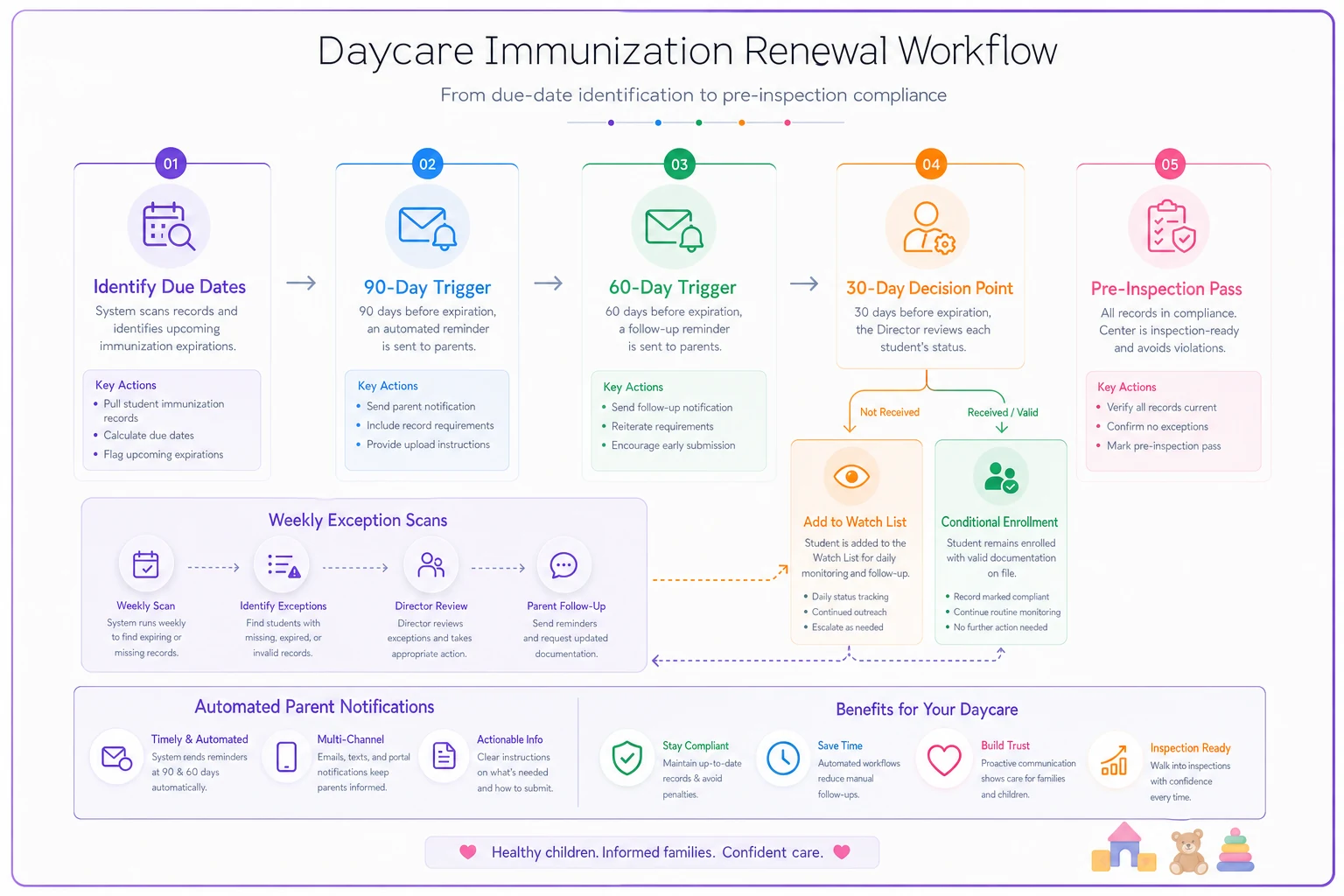
This flow highlights where the 30-day human decision sits between automated triggers and the director-level pre-inspection pass.
The key point in that flow: the 30-day stage is where human judgment enters. Everything before it is routine and schedulable. Everything after it requires a director call—conditional enrollment language, exclusion timelines, what to document if the appointment is booked but falls after the deadline. Automating the first two triggers is easy. The 30-day escalation is where you need a real decision-maker paying attention.
Reminder wording that actually gets a response
The reminder content matters more than people give it credit for. A vague "your child's records need updating" gets ignored. A reminder that tells the parent exactly what's needed, by when, and what happens if they don't act gets results.
90-day (informational, friendly): > Hi [Parent], a quick heads-up: [Child]'s next immunization is due around [month]. Pediatrician appointments can book out a few weeks, so now's a good time to schedule. Once you have the updated record, send us a photo or bring the card in. Thanks!
60-day (confirming): > Hi [Parent], following up on [Child]'s upcoming immunization due [date]. Have you been able to book the appointment? If you've already got the updated record, just reply with a photo and we'll update the file. Let us know if you need the current record for the doctor.
30-day (specific + consequence): > Hi [Parent], [Child]'s immunization record for [vaccine] is due by [date]. To stay enrolled per [state] requirements, we'll need the updated record on file by then. If the appointment is scheduled but falls after that date, please send us proof of the booking so we can note it. Reply here or call [number]—happy to help sort this out.
-
Name the specific vaccine and the specific child. Generic reminders feel like spam.
-
Make the reply path frictionless—a photo of the card by text beats "please come to the office during business hours."
-
State the consequence plainly only at 30 days. Don't lead with threats, but don't bury the exclusion/conditional-enrollment reality when it's actually close.
-
Log every reminder sent. A timestamped record showing you reminded the parent three times is part of your audit trail if a child ends up excluded.
That last point is underrated. If you ever have to exclude a child for a lapsed record, being able to show "we notified the family on these three dates" is what protects you from the "nobody told me" conversation.
The director pre-inspection checklist
Even with triggers and weekly scans running, a focused director-level pass on the full immunization roster on a set cadence still matters—monthly is reasonable for most centers, quarterly if your weekly scans are consistently clean. This isn't the weekly exception scan. It's a deliberate, slower review of the whole roster as if a surveyor were standing next to you.
-
- [ ] Every enrolled child has a record on file—cross-check against the current enrollment list, not last month's
-
- [ ] No record is past due (and if one is, there's a documented action note attached)
-
- [ ] Every record is legible—dates readable, provider info present, nothing faded or cut off in a scan
-
- [ ] Exemptions/waivers are complete and match current state requirements, with any required renewal dates noted
-
- [ ] New enrollments from the last 30 days have their cards in—this is where gaps hide
-
- [ ] Children who recently aged into a new dose requirement (e.g., just hit 12 months, 4 years) have updated records
-
- [ ] Reminder logs show the 90/60/30 messages went out for anyone currently in a trigger window
-
- [ ] The format matches what your licensor expects—some states want a specific immunization form, not just the pediatrician's printout
-
- [ ] Withdrawn children have been removed from the active roster so your counts match
The reason this is a director task and not a front-desk task: the director is the one who has to decide what to do with the gray-area cases—the conditional enrollments, the pending exemptions, the kid whose appointment is two days after the deadline. Those judgment calls shouldn't sit in someone's inbox unresolved.
If your center is also preparing for accreditation on top of licensing, the same evidence-capture discipline applies. There's more on building that habit in the NAEYC and QRIS evidence-capture runbook—immunization records are one of the document sets that overlaps between the two.
A real scenario
A mid-sized center—around 75 kids, two administrators—ran immunization tracking out of a physical binder plus a shared spreadsheet that one admin updated "when she had time." They passed inspections, mostly, but every visit involved a stressful scramble and usually one or two flagged records.
During one unannounced visit, the surveyor pulled six files at random. Three had doses that had come due within the prior two months with no updated record and no evidence anyone had contacted the family. The center got a correction notice and a follow-up visit requirement.
The actual problem wasn't the three families. Two of those parents had the updated cards sitting in a diaper bag—they just hadn't been asked. The center had no trigger telling anyone those doses had come due.
After switching to a 90/60/30 trigger structure with a weekly exception scan, the change was less about dramatic numbers and more about the absence of surprises. Over the next couple of inspection cycles, the random file pulls came back clean. The Monday scan took one admin about 15–20 minutes and usually surfaced two or three kids entering a trigger window—caught months early instead of weeks late. The follow-up visit requirement went away. More importantly, the week-before-inspection panic disappeared because there was nothing left to scramble over.
When a lighter version makes sense (and when it doesn't)
A small center under roughly 25 kids can run this mostly manually. A single well-maintained spreadsheet with due-date columns and a disciplined Monday review will genuinely hold up. The 90/60/30 logic still applies; you just enforce it by hand.
Where the manual version breaks down is somewhere around 40–50+ kids, or the moment you add a second location. The number of independent due-date clocks exceeds what one person can reliably track or scan accurately every week. That's when missed triggers start slipping through, and that's typically when centers move tracking into their management software so the scan runs automatically and the reminder log keeps itself.
Who should not rely on a purely manual system: any center where immunization tracking depends on one specific person. If that person is out sick the week a surveyor shows up, you want the system—not someone's memory—to be the thing that knows which records are current. The whole point of scheduled verification is that it doesn't care who's in the building that day.
Keeping it inspection-ready without the fire drills
The difference between centers that dread immunization checks and centers that barely notice them comes down to one habit: treating renewal as a continuous, scheduled process instead of a document collected once at enrollment.
Three triggers give parents enough runway to actually comply. A weekly verification scan turns the roster from an invisible drift into a one-page exception list. Specific, logged reminders get records in and protect you if a child has to be excluded. A periodic director pass catches the gray-area cases before a surveyor does.
None of this is complicated. It's just the discipline of deciding, in advance, when and how you'll check—so that the day an inspector pulls a random file, the answer is already sitting in the folder, current and legible, exactly where it should be.
Ready to transform your daycare operations?
Join hundreds of daycare centers using Carexly to save time, improve communication, and enhance child care quality.