


Most centers can tell you which credentials each staff member holds. Pull up a spreadsheet, and there they are: CPR, first aid, background check dates, mandated reporter training, medication administration certs, ECE unit counts. That's not where things break.
Where they break is the gap between "this expires in six weeks" and "someone actually got recertified and the new certificate is in the file." That gap is where centers fail inspections, run classrooms with an out-of-ratio qualified staffer, and scramble to pay for last-minute weekend CPR courses at three times the normal rate.
A real credential registry isn't a list. It's a set of triggers tied to dates, with someone (or something) responsible for acting on each trigger before the deadline instead of after.
Why the spreadsheet fails at exactly the wrong moment
The typical setup is a shared Google Sheet with columns for each credential and expiration date. It works fine until it doesn't, and the failure is always the same shape.
The expiration date sits quietly in a cell. Nobody looks at it for months. Then either an inspector asks for current documentation, or a director happens to sort the sheet and notices four credentials expired last Tuesday. By then the staffer has been working uncertified for days, which in most states means the center was technically out of compliance the entire time.
-
The date is recorded, the renewal isn't triggered. A cell holding "03/14/2024" does nothing on its own. It needs to generate an action somewhere around January.
-
Renewals cluster. New hires often complete CPR, first aid, and orientation trainings in the same week, which means they all expire in the same week two years later. Suddenly you've got three people needing recerts at once.
-
Nobody owns the follow-up. The sheet is "everyone's" responsibility, which means it's no-one's. The director assumes the lead teacher is watching it; the lead teacher assumes the office manager is.
-
Provisional windows get missed. A new hire brought on conditionally has, say, 90 days to complete a health screening or specific training. That clock is invisible in a static sheet.
The consequence isn't just an inspection ding. There's a scenario that plays out more than you'd think: a center lets a lead teacher's CPR certification lapse for about five weeks without noticing. During that window an infant room injury occurs — minor, reportable. The lapsed cert turns a routine incident into a documentation problem because the qualified-staff requirement wasn't met on paper at the time. Nothing catastrophic, but the licensing follow-up eats hours and puts the center on a watch list for the next cycle.
The registry schema: what each credential record actually needs
Before you automate anything, the underlying data has to hold the right fields. Most spreadsheets track two: credential name and expiration date. That's not enough to trigger anything useful.
Eliminate administrative bottlenecks.
Carexly helps you manage enrollments, attendance, and staff schedules effortlessly.
- Streamlined child enrollment
- Automated parent notifications
- Staff shift and activity scheduling
No credit card required
| Field | Why it matters |
|---|---|
| Staff member + role | Determines which requirements apply (lead teacher vs. aide vs. director) |
| Credential type | CPR, first aid, background check, mandated reporter, med admin, ECE units, TB test, etc. |
| Issue date | Needed to calculate renewal windows and spot clustering |
| Expiration date | The core trigger anchor |
| Renewal lead time | How early action must start (CPR ≈ 30 days; background checks ≈ 60–90) |
| Required vs. optional | Not every cert is compliance-critical for every role |
| Provisional deadline | For conditional hires with a fixed completion window |
| Document link | Actual certificate file, not just a "yes" checkbox |
| Owner | The specific person responsible for this renewal, not "the team" |
| Status | Current / renewal-window / overdue / lapsed |
The renewal lead time field is the one most centers skip, and it's the one that makes automation actually work. A CPR cert and a background check both "expire," but you can't treat them the same. Reprinting a CPR card takes an afternoon. Re-running a background check through your state system can take weeks. If both trigger 30 days out, the background check will still lapse.
Expiry-triggered task automation: turning dates into actions
The whole point of the registry is that dates generate tasks automatically. A date should never sit there passively. When the current date crosses the "expiration minus lead time" threshold, a task appears — assigned to a named owner, with a due date.
-
T-minus lead time (e.g., 45 days out) Task created and assigned to the owner. Alert: "Sarah's first aid expires 03/14. Schedule renewal course." Status flips to renewal-window.
-
T-minus 21 days If the credential status hasn't updated to reflect a scheduled or completed renewal, a reminder fires to the same owner.
-
T-minus 7 days Reminder escalates — now it copies the director. Status still renewal-window, but flagged.
-
Expiration day, if not renewed Status flips to lapsed. The affected staffer is flagged as not-currently-qualified for ratio and assignment purposes.
-
Post-renewal New document uploaded, dates updated, status returns to current, tasks close automatically.
One thing worth noting: the trigger should key off status change, not just calendar dates. If someone marks a renewal "scheduled for 03/02," the 21-day and 7-day reminders shouldn't fire — the action is already in motion. Systems that send alerts regardless of progress get muted fast, and once staff learn to ignore them, you're back to the broken spreadsheet with extra steps.
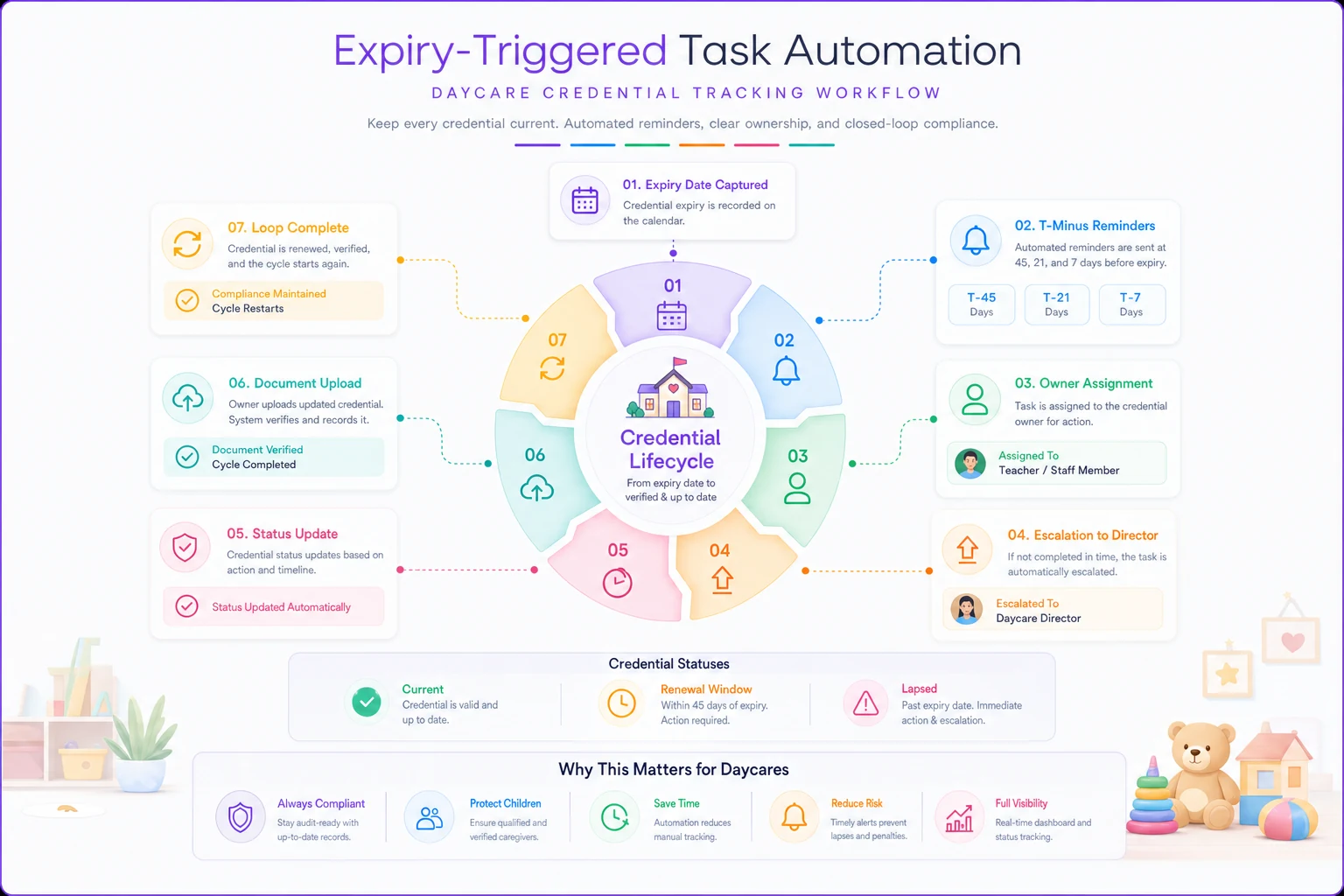
This image shows how a date becomes an owned task and how reminders and escalations flow if actions aren't taken.
Training-window scheduling: getting ahead of the clustering problem
The renewal-clustering issue is predictable, which means it's preventable.
-
Stagger renewals on purpose. When a cluster of certs is coming due within the same 30-day window, pull one or two forward by a few weeks even if they haven't technically expired. A CPR card renewed a month early costs nothing extra and removes a bottleneck from your plate.
-
Batch training economically without creating spikes. Group renewals to get instructor discounts, but spread the batches across the year rather than concentrating them. If a local trainer charges a flat rate for up to eight people, one session in March and one in September beats scrambling for individual seats.
-
Reserve training windows before you need them. Many centers book renewal courses reactively, at the worst possible price. If you know from the registry that six people need CPR recerts across Q2, you can book the trainer in January.
A center running around 14 staff might spend somewhere in the $40–$70 range per person on last-minute individual CPR renewals versus a group rate closer to $25–$35 when booked ahead. Across a full year of renewals that's a few hundred dollars back, plus the hours saved not chasing available seats. Not enormous, but it's margin recovered purely from better timing.
Tiered escalation: who hears about it, and when
A single reminder to a single person is fragile. If that person is out sick, on vacation, or just buried, the credential lapses silently. Escalation ladders fix this by widening the circle of visibility as the deadline approaches.
-
Tier 1 (routine) The assigned owner — usually the office manager or a lead teacher — gets the initial task and the first reminder. No one else involved. Most renewals resolve here.
-
Tier 2 (at risk) If the credential is inside roughly 14 days and still shows no scheduled renewal, the director is copied. This is the "someone dropped the ball, let's catch it" tier.
-
Tier 3 (critical) At expiration or once lapsed, the owner/administrator is notified directly, and the affected staffer's assignment status changes so scheduling knows they can't count toward ratio in a role requiring that credential.
Tier 3 has to touch scheduling because a lapsed credential quietly breaks your ratios. A "qualified" teacher who's technically uncertified may still be physically in the room, but on paper you're short. If your scheduling and credential data don't communicate, you'll discover this the hard way. This connects directly to how staffing coverage and qualification interlock across your center — worth mapping into your broader hire-to-retain staffing lifecycle so credential status is part of who's actually schedulable, not an afterthought.
Alert templates you can use today
Vague alerts get ignored. "Credential expiring soon" tells the reader nothing actionable. Good alerts name the person, the credential, the date, and the exact next step.
Tier 1 — initial task (45 days out): > First aid certification for Sarah M. expires 03/14. Book a renewal course before 02/28. Owner: office manager. Reply with the scheduled date to clear reminders.
Tier 1 — reminder (21 days out, no update): > Reminder: Sarah M.'s first aid renewal (expires 03/14) still shows no scheduled date. Please book this week.
Tier 2 — escalation (14 days, copied to director): > ⚠️ At-risk credential: Sarah M. first aid expires in 14 days with no renewal scheduled. Director copied. Needs action by end of week to avoid a coverage gap.
Tier 3 — lapse notice: > 🔴 Sarah M.'s first aid certification lapsed as of 03/14. She is now flagged as not-currently-qualified for [room/role]. Update scheduling and complete renewal before assigning her to that ratio.
Provisional-window alert (conditional hire): > New hire James T. must complete health screening by 90-day deadline 04/22. 30 days remaining. Missing this requires removal from ratio-counting assignments.
Keep the wording boring and specific. The goal isn't urgency — it's making the required action unmissable and un-ignorable.
A short real scenario
A two-room center with roughly 16 staff was tracking credentials in a spreadsheet reviewed "monthly," which in practice meant whenever the director remembered. Over about a year they had two separate lapses caught only during a licensing visit — one background check renewal that had slipped, and a med-administration cert that expired while the staffer was still giving medication.
Neither caused harm, but both landed in the inspection report and required corrective action plans. The med-admin lapse in particular created real exposure — the kind of documentation gap that turns an ordinary audit into a stressful one. Their role-mapped compliance workflow needed the same treatment to keep audits from derailing operations entirely. After rebuilding the registry around triggers and a three-tier ladder — nothing fancy, just owned tasks firing 45/21/7 days out with director escalation inside two weeks — they went the next full licensing cycle with zero lapses caught by an inspector. Everything renewed inside its window. The director estimated she spent maybe 20 minutes a week reviewing the escalation queue instead of dreading the monthly spreadsheet sort. Renewals cost slightly less too, because they were booked ahead instead of in a panic.
Rollout plan: getting from spreadsheet to working registry
You don't need to do this all at once. Trying to usually stalls. Here's a sequence that gets you live in about three weeks without disrupting operations.
-
Week 1 — Inventory and clean. Pull every current credential into the schema above. Add the missing fields: renewal lead time, owner, document links. It's tedious, but it's the foundation. Expect to find at least a couple of credentials already expired or missing documentation entirely — that discovery alone justifies the exercise.
-
Week 1–2 — Assign owners. Every credential gets a named owner. Not a department. A person. Resolve the "I thought you were watching it" gaps now.
-
Week 2 — Set lead times and triggers. Assign realistic lead times by credential type. Background checks and anything routed through a state system get longer windows. Build the 45/21/7 trigger points.
-
Week 2–3 — Configure the escalation ladder. Define who sits at each tier and connect Tier 3 to your scheduling and assignment logic so lapses actually affect ratio counting.
-
Week 3 — Test with a near-term expiration. Find a credential expiring in the next 60 days and watch the full sequence fire. Fix the alert wording if anything reads as vague.
-
Ongoing — Review the queue weekly. A short standing review of the escalation queue replaces the dreaded monthly spreadsheet sort.
Setup checklist
-
- [ ] Every credential has issue date, expiration date, and a document link
-
- [ ] Renewal lead times set per credential type (not one-size-fits-all)
-
- [ ] Each credential has a single named owner
-
- [ ] Provisional/conditional hires have completion-deadline tracking
-
- [ ] Trigger points defined (e.g., 45/21/7 days)
-
- [ ] Escalation tiers mapped to specific people
-
- [ ] Tier 3 lapse status connected to scheduling/ratio logic
-
- [ ] Alert templates use names, dates, and specific next steps
-
- [ ] Renewal-clustering identified and deliberately staggered
-
- [ ] Weekly escalation-queue review scheduled
Ongoing — Review the queue weekly. A short standing review of the escalation queue replaces the dreaded monthly spreadsheet sort.
When this level of structure makes sense — and when it doesn't
When it's worth building: Any center with more than about eight staff, or one operating multiple rooms where a single lapse breaks a ratio. Once you're juggling more than a couple dozen credentials across staff, the manual approach fails predictably. The cost of one inspection finding outweighs the setup effort many times over.
When it's overkill: A tiny home-based operation with two or three staff can probably run a well-maintained calendar with reminders and be fine. The escalation ladder adds little when there's only one person who'd ever get escalated to. Don't build a three-tier system for a team where every tier is the same person.
Who should not skip the owner-assignment step: Anyone tempted to shortcut straight to alerts without naming owners. Alerts with no clear owner are just notifications everyone assumes someone else will handle — the exact failure mode of the spreadsheet, dressed up with more emails.
The registry isn't about having better records. Plenty of centers with immaculate records still fail on lapsed credentials, because a perfect record of an expired cert is still an expired cert. What actually prevents the failure is the mechanism that turns a quiet date into an owned action three weeks before it matters — and makes sure that if the first person misses it, someone else sees it in time.
Ready to transform your daycare operations?
Join hundreds of daycare centers using Carexly to save time, improve communication, and enhance child care quality.