

Payroll day at daycare centers shouldn't mean three hours of spreadsheet gymnastics trying to match attendance records with scheduled hours. Yet every two weeks, administrators sit there cross-referencing paper sign-in sheets, digital check-ins, teacher timecards, and whatever notes got scribbled on the daily roster.
The real mess happens when you discover discrepancies at 4pm on payroll deadline day. A teacher says they stayed late Tuesday for parent pickup delays. Another swears they came in early Monday to cover a sick colleague. Your attendance system shows one thing, the schedule shows another, and now you're playing detective while Gusto's submission deadline looms.
Most daycare centers lose around 2-4 hours every pay period just reconciling attendance data for payroll. That's before dealing with questions about rounded hours, approved overtime, or why someone's paycheck looks different than expected. These manual fixes create compliance risks when your attendance records don't match what you're actually paying people.
The attendance-to-payroll gap that creates errors
Your attendance tracking system and payroll system speak different languages. Attendance tracks Sally checked in at 6:47am. Payroll needs to know if that rounds to 6:45am or 7:00am based on your policies. Attendance shows Mike stayed until 6:23pm for late pickup coverage. Payroll needs overtime approval documentation if that pushed him past 40 hours.
This translation problem multiplies across every employee, every day. A center with 15 staff members generates roughly 150 attendance records per week that need converting into payroll-ready data. Each conversion point creates opportunity for errors that either shortchange employees or inflate labor costs.
The format mismatch makes things worse. Your attendance system might export timestamps like "2024-03-15 06:47:23" while your payroll system expects "3/15/24" with separate columns for regular hours and overtime. Some systems want daily breakdowns, others want weekly totals. Meanwhile you're copy-pasting between three different spreadsheets hoping the formulas don't break.
Exception handling derails the process every time. Every daycare payroll period includes situations that don't fit the standard pattern. A teacher covers another classroom during naptime. Someone attends mandatory training on Saturday. An assistant director fills in for an absent infant room teacher, requiring different pay rates. These exceptions usually get tracked in separate notes, emails, or verbal approvals that somehow need merging into the final payroll file.
When manual timekeeping becomes a compliance nightmare
Employee handbooks say you round to the nearest 15-minute increment. But when processing payroll manually, you might round 7:07am to 7:00am one week and 7:15am the next week for the same employee. That inconsistency becomes a wage claim waiting to happen.
Eliminate administrative bottlenecks.
Carexly helps you manage enrollments, attendance, and staff schedules effortlessly.
- Streamlined child enrollment
- Automated parent notifications
- Staff shift and activity scheduling
No credit card required
Consider overtime calculations. A teacher works 38 scheduled hours but picks up two extra afternoon shifts covering for absences. Those additional 5 hours push them to 43 hours total. Without clear documentation showing director approval for that overtime, you're vulnerable during a Department of Labor audit. The attendance records show they worked the hours, but there's no audit trail for the authorization.
State licensing adds another layer. Many states require maintaining attendance records for both staff and children for 3-5 years. If your payroll records don't match your attendance records, inspectors start asking uncomfortable questions. They want to verify you're maintaining proper ratios, and inconsistent records suggest you might be fudging coverage numbers.
Retroactive fixes are the real compliance killer. An employee mentions three weeks later that they forgot to clock out one day and actually worked two extra hours. You want to make it right, but now you're adjusting previous payroll periods, potentially affecting overtime calculations and tax withholdings. Without proper documentation of these adjustments, you're creating an audit trail full of red flags.
Setting up capture templates that match payroll requirements
A working daycare payroll timekeeping system starts with standardized data capture. Every attendance record needs capturing the same core fields in formats your payroll system can digest.
Start with a basic template structure:
| Field | Format | Example | Payroll Mapping |
|---|---|---|---|
| Employee ID | Numeric | 10234 | Employee Code |
| Date | MM/DD/YYYY | 03/15/2024 | Work Date |
| Clock In | HH:MM AM/PM | 7:00 AM | Start Time |
| Clock Out | HH:MM AM/PM | 3:30 PM | End Time |
| Break Start | HH:MM AM/PM | 12:00 PM | Break Begin |
| Break End | HH:MM AM/PM | 12:30 PM | Break End |
| Total Hours | Decimal | 8.00 | Regular Hours |
| Overtime Hours | Decimal | 0.00 | OT Hours |
| Department | Text | Toddler Room | Cost Center |
| Pay Type | Code | REG | Pay Code |
The template needs flexibility for common daycare scenarios. Split shifts when someone works morning in infants then afternoon in pre-k. Training hours that pay differently than classroom time. Holiday pay calculations. Each variation needs its own row with clear coding.
Enforce Employee IDs must match your master list at the data entry point to prevent mismatches during export.
Build separate templates for different export destinations. QuickBooks wants data one way, ADP another way, Paychex yet another. Rather than manually reformatting every pay period, create specific export templates that match each system's import requirements exactly.
Your capture template should enforce data validation at entry point. Clock-in times must be before clock-out times. Daily hours can't exceed 24. Employee IDs must match your master list. These simple checks prevent the errors that eat up hours during payroll processing.
Approved rounding rules that keep everyone happy
Rounding rules in daycare get complicated fast. Parents drop off at unpredictable times. Staff arrive early to prep classrooms. Someone stays late because a parent got stuck in traffic. Without clear, consistent rounding policies, you'll face constant disputes about pay.
Most centers use 15-minute rounding, but implementation varies wildly. Some round to nearest quarter hour, others always round down for clock-in and up for clock-out. Pick rules that are legally defensible and operationally practical.
Clock In Rounding (7-minute rule):
-
6
53-7:07 → rounds to 7:00
-
7
08-7:22 → rounds to 7:15
-
7
23-7:37 → rounds to 7:30
-
7
38-7:52 → rounds to 7:45
Clock Out Rounding (7-minute rule):
-
3
23-3:37 → rounds to 3:30
-
3
38-3:52 → rounds to 3:45
-
3
53-4:07 → rounds to 4:00
-
4
08-4:22 → rounds to 4:15
The 7-minute rule satisfies most state requirements for neutral rounding that doesn't systematically favor employer or employee. Document these rules clearly and apply them consistently through automated systems, not manual judgment calls.
Grace periods add another wrinkle. Many centers allow 5-minute grace periods for lateness without penalty. But that grace period shouldn't affect pay calculations. Someone scheduled at 7:00am who arrives at 7:04am doesn't get docked pay, but their time still rounds according to standard rules.
Exception workflows for overtime and schedule changes
Every payroll period brings exceptions. A lead teacher calls in sick, so an assistant works alone earning lead teacher pay rate for the day. Someone attends weekend training that counts toward their weekly hours. The infant room teacher stays three hours past schedule because of ratio requirements during an unexpected absence.
These exceptions need structured approval workflows, not informal verbal agreements. When overtime becomes necessary, the approval should happen before the hours get worked, not after. Create a simple exception form that captures: who's requesting, why it's needed, hours involved, and director approval.
The workflow might follow this pattern:
-
Supervisor identifies need for exception (coverage gap, training requirement, special event)
-
Submits exception request with justification
-
Director reviews impact on payroll budget and ratios
-
Approval or denial logged with timestamp
-
Affected employee notified of approved additional hours
-
Exception linked to actual time worked for payroll processing
Below is a simple diagram of the exception approval workflow.
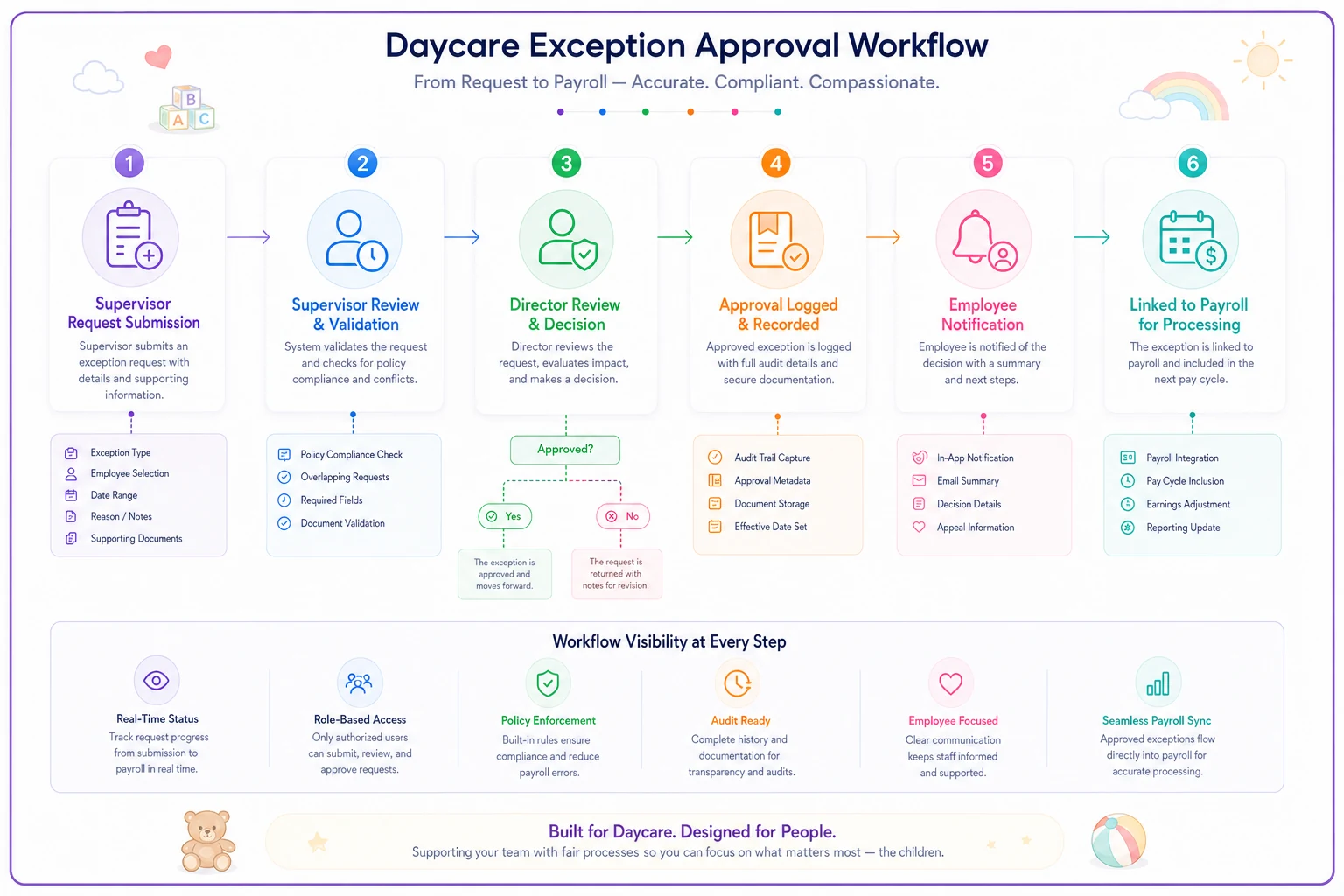
This visual helps ensure every approval is logged before payroll.
For overtime specifically, set thresholds that trigger different approval levels. Under 2 hours of overtime might need supervisor approval. 2-5 hours requires director sign-off. Anything over 5 hours needs owner authorization. This prevents surprise payroll overages while maintaining flexibility for operational needs.
Document every exception digitally, even if approval happens verbally in the moment. A teacher staying late for emergency coverage might get verbal approval, but someone should log that approval before payroll processing. These logs become your defense during audits or wage disputes.
Building audit trails that protect during inspections
State licensing inspectors and Department of Labor auditors don't care that you meant to document that schedule change. They want to see clear records showing who worked when, who approved variations, and how those hours translated into pay.
An effective audit trail connects four elements: scheduled hours, actual worked hours, approved exceptions, and final payroll records. Any discrepancy between these elements needs clear documentation explaining the variance.
Your audit notes should capture specific scenarios:
-
"Sarah worked 7
00am-5:30pm (10.5 hrs) instead of scheduled 8:00am-4:00pm (8 hrs) due to Maria's absence - approved by Director Johnson 3/15 8:47am"
-
"Training hours 3/17 9am-1pm added for mandatory CPR certification renewal - pre-approved 3/10"
-
"Clock-out missed 3/19, manual entry of 5
00pm based on parent pickup log showing last child left at 4:47pm"
These notes seem excessive until an auditor asks why someone got paid for 42 hours when the schedule showed 38. Without documentation, you're relying on memory and hoping the employee confirms your version of events.
Keep these audit trails for longer than required minimums. While state requirements might specify 3 years, keeping 5 years of records protects you from late-filed claims and gives you historical data for defending your practices.
CSV export formats for common payroll systems
Getting clean data into your payroll system requires following each platform's specific formatting requirements exactly. Miss these details and you're back to manual re-entry.
QuickBooks Desktop Format:
Employee,Date,Hours,Pay Type,Class "Smith, John",03/15/2024,8.00,Regular,Toddler Room "Smith, John",03/16/2024,8.00,Regular,Toddler Room "Jones, Mary",03/15/2024,6.00,Regular,Infant Room "Jones, Mary",03/15/2024,2.00,Overtime,Infant Room
ADP Workforce Now Format:
File#,Employee ID,Pay Date,Hours Type,Hours,Department 001,EMP10234,03/29/2024,REG,80.00,TODD 001,EMP10234,03/29/2024,OT,3.50,TODD 001,EMP10235,03/29/2024,REG,72.00,INF
Paychex Flex Format:
Employee SSN,Check Date,Earning Code,Hours,Rate,Amount --1234,03/29/2024,REG,80.00,18.50, --1234,03/29/2024,OVT,3.50,27.75, *--5678,03/29/2024,REG,72.00,16.00,
Notice how each system expects different date formats, different column orders, and different codes for the same concepts. Manually reformatting this data every pay period wastes time and introduces errors. Build these export templates once, test them thoroughly, then use them consistently.
Most payroll systems also accept additional fields for job costing. If you track hours by classroom for budgeting purposes, include that data in your exports. This gives you better visibility into labor costs per program without maintaining separate spreadsheets.
Manual verification steps you can't skip
Even with templates and workflows, certain manual checks remain essential. Before submitting payroll, scan for obvious anomalies that suggest data problems.
Look for impossible patterns:
-
Anyone with more than 12 hours in a single day
-
Part-time employees showing full-time hours
-
Scheduled employees showing zero hours
-
Identical clock-in/clock-out times
-
Weekend hours for Monday-Friday employees
Check for missing data that affects pay:
-
Employees with approved time off but hours still showing
-
New hires missing from the export
-
Terminated employees still appearing
-
Split shifts showing as single shifts
-
Training hours not coded separately
Review exception patterns:
-
Multiple employees with identical overtime hours (suggests formula error)
-
Overtime appearing for employees under 40 total hours
-
Missing lunch breaks for shifts over 6 hours
-
Suspiciously round numbers across all employees
These checks take maybe 10 minutes but catch errors that would otherwise trigger payroll corrections, upset employees, and potentially violate wage laws.
When automated systems actually help
The volume of attendance data in daycare operations makes manual processing increasingly risky as you grow. A 10-person center might manage with spreadsheets, but once you hit 20+ employees across multiple classrooms, the complexity overwhelms manual systems.
Modern childcare administrative systems can eliminate most translation errors between attendance and payroll. Instead of copying data between systems, attendance records flow directly into payroll-ready formats. Rounding rules apply automatically and consistently. Exception approvals get logged with proper documentation.
The real value shows up in time savings and error reduction. Centers using integrated attendance and payroll workflows typically cut processing time from 3-4 hours to under 30 minutes per pay period. More importantly, they see wage disputes and payroll corrections drop by roughly 80%.
But automation only works if you've defined clear processes first. The software can't decide your rounding rules or approval hierarchies. It can't determine which exceptions are acceptable. Those operational decisions need to happen before implementing any technical solution.
Making classroom timekeeping actually work
Getting daycare payroll timekeeping right means accepting that attendance data and payroll data serve different purposes but must ultimately reconcile. Your attendance system tracks coverage for ratios and parent billing. Your payroll system calculates wages and taxes. Building bridges between these systems - through templates, rules, workflows, and audit trails - eliminates the chaos of payroll day.
The centers that struggle with payroll errors usually have decent attendance tracking and acceptable payroll systems. What they lack is the connection layer that translates between them reliably. They treat each pay period as a unique puzzle to solve rather than a repeatable process to execute.
Start with one piece: standardize your rounding rules and document them clearly. Then build your exception approval workflow. Add audit note requirements. Create your CSV export templates. Each improvement reduces errors and saves time, even if you're still doing some manual work.
The goal isn't perfection on day one. It's building a systematic approach that reduces scheduling and payroll friction while maintaining compliance. Every hour you don't spend fixing payroll errors is an hour you can spend on what actually matters - running a quality childcare program that serves families and supports your teachers.
Your payroll process should be boring and predictable, not a biweekly adventure in spreadsheet archaeology. With the right templates, rules, and workflows, you can make payroll day just another routine task instead of an operational crisis.
Your payroll process should be boring and predictable, not a biweekly adventure in spreadsheet archaeology. With the right templates, rules, and workflows, you can make payroll day just another routine task instead of an operational crisis.
Ready to transform your daycare operations?
Join hundreds of daycare centers using Carexly to save time, improve communication, and enhance child care quality.