

Most centers don't end up with a messy integration setup on purpose. It just accumulates. You start with a billing tool, add a parent-communication app because families kept asking, bolt on a payroll export because your bookkeeper begged you to, and eighteen months later you've got a child's name spelled three different ways across four systems and nobody can tell you which one is right.
The frustrating part is that each individual tool works fine. The problem lives in the seams between them — where a child record leaves one system and shows up (or doesn't) in the next. That's where enrollment counts drift, where a family gets double-billed, where a subsidy claim quietly fails because the DOB field imported blank.
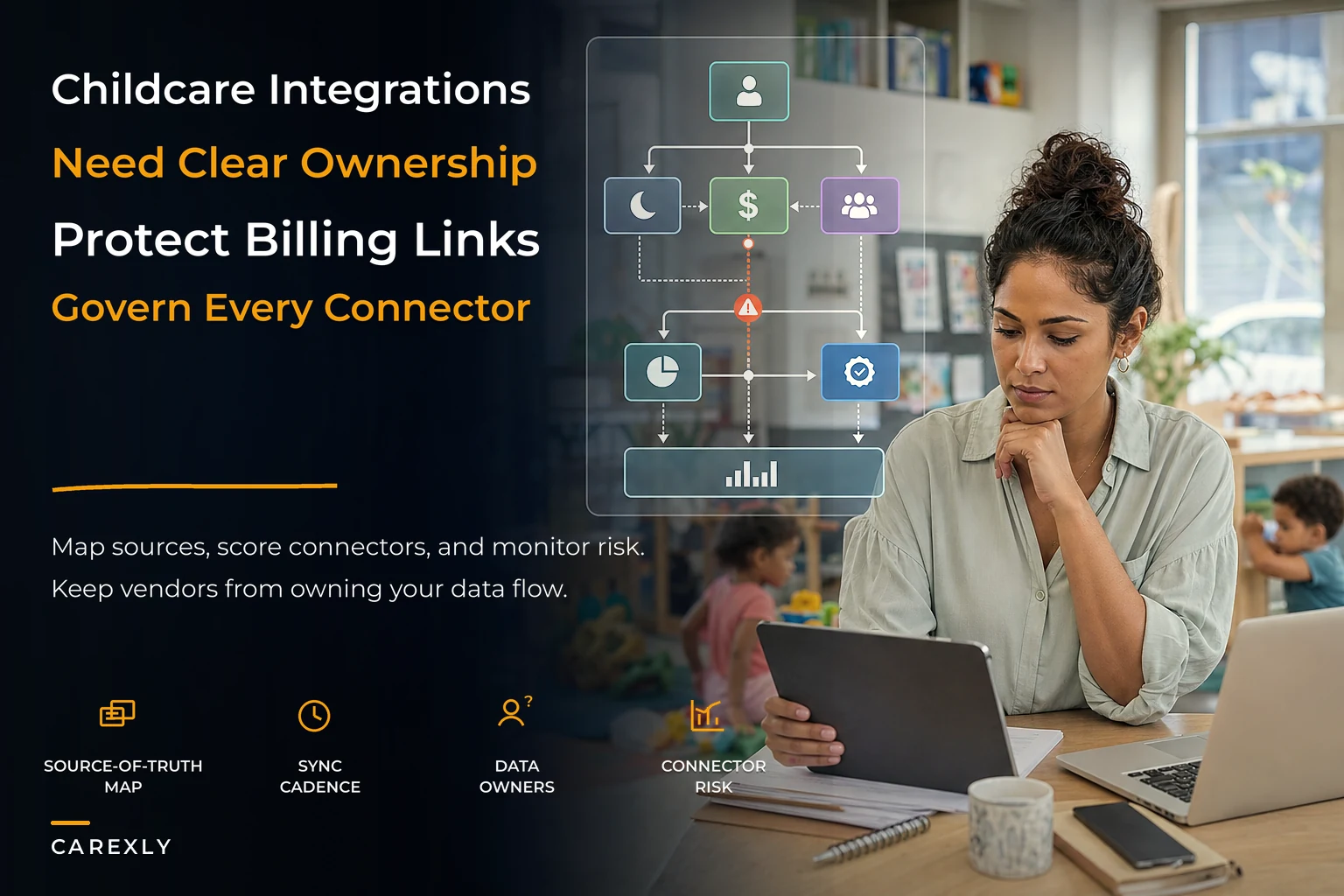
This piece is about designing those seams on purpose. Not "which app is best," but how you decide what your source of truth is for each piece of data, how you score a connector before you trust it, and how you keep the whole thing healthy as you grow. If you've already been through the pain of consolidating conflicting reports — the kind covered in the single-source governance and reporting cadence post — this is the architectural layer underneath that.
Start with master data, not with apps
Almost everyone approaches integrations backwards. They ask "how do I connect Tool A to Tool B?" The better first question is "what are the core entities my whole business runs on, and where does the truth for each one live?"
-
Child — name, DOB, classroom/age group, enrollment status, allergies/medical flags
-
Family/Guardian — contacts, authorized pickups, billing responsibility split
-
Staff — role, credentials, hire date, ratio-qualification status
-
Classroom/Room — capacity, licensed ratio, age band
-
Enrollment — the link between a child and a schedule, with start/end dates
-
Financial account — tuition plan, discounts, subsidy source, balance
Every integration you'll ever build moves one of these entities — or a piece of one — between systems. If you haven't defined what a "Child" record officially contains and which system owns it, every connector you set up is guessing. And guessing is where the drift starts.
Something worth noticing: the fields that cause the most integration pain are almost never the obvious ones. It's not the child's name. It's the messy in-between stuff — enrollment status (is "withdrawn" the same as "inactive" the same as "graduated"?), the billing responsibility split when parents are divorced, or the difference between a staff member's hire date and their ratio-eligible date. Those are the fields that silently break reports.
Source-of-truth mapping: one owner per field
One rule fixes more integration problems than anything else: for every field, exactly one system is the owner, and everything else is a copy.
Eliminate administrative bottlenecks.
Carexly helps you manage enrollments, attendance, and staff schedules effortlessly.
- Streamlined child enrollment
- Automated parent notifications
- Staff shift and activity scheduling
No credit card required
Not "these two systems both have the phone number." One of them owns it. The other displays a copy it received. When they disagree, you already know which one wins — no meeting required.
| Entity / Field | System of Record (owns it) | Systems that read a copy | Sync direction |
|---|---|---|---|
| Child name, DOB | Enrollment/CRM | Billing, Comms, Attendance | One-way out |
| Enrollment status | Enrollment/CRM | Billing, Reporting | One-way out |
| Attendance check-in/out | Attendance app | Billing (for hourly), Reporting | One-way out |
| Tuition plan & balance | Billing | Reporting, Parent portal | One-way out |
| Staff credentials | HR/Credential tracker | Scheduling (ratio check) | One-way out |
| Authorized pickups | Enrollment/CRM | Attendance/Comms | One-way out |
In real operations, trouble usually shows up when two systems both let staff edit the same field. Someone updates a parent's phone number in the billing platform, someone else updates it in the parent-comms app, and now you've got two live versions with no way to know which is newer. Multiply that across 90 families and you've built yourself a permanent low-grade data mess.
When two-way actually makes sense: it's genuinely useful when something like attendance has both a front-desk kiosk and a teacher's tablet writing check-ins independently. But even then, you want a conflict rule — "last write wins" or "teacher tablet overrides kiosk" — decided in advance and written down. Not improvised at 8am during drop-off.
Scoring a connector before you trust it
Every integration path is either a real API, a native connector inside one of your tools, a middleware step, or — the one that quietly ruins your data — a manual CSV export/import.
Before you rely on any of these, score it. A quick 1–5 rating across a few dimensions tells you whether a connector belongs in your operation or whether it's a liability waiting to happen.
-
Reliability — Does it run on a schedule automatically, or does someone have to remember to click it? Manual = automatic 1 or 2.
-
Field coverage — Does it move all the fields you actually need, or does it quietly drop the messy ones like enrollment status and subsidy source?
-
Error visibility — When a sync fails, do you get told? Silent failures are the worst kind. A connector that fails loudly beats one that fails quietly every time.
-
Direction clarity — Is it clean one-way, or does it try to sync both ways with no conflict rule?
-
Recovery — If it dumps bad data, can you roll back or re-run cleanly?
Add the scores. Anything landing below the midpoint should be flagged as fragile — either fix it, wrap monitoring around it, or plan to replace it. A typical example: a center scored their billing-to-payroll export a 2 because it was a monthly manual CSV nobody double-checked. Three payroll cycles later they found roughly $600 in hours that hadn't crossed over correctly. The low score had predicted exactly that.
Treat a manual CSV export as a temporary measure—plan to automate or wrap monitoring around it.
The insight most people miss: a manual export that "works fine" is not a working integration. It's an unpaid job assigned to a human who will eventually forget, get sick, or leave. Score it as the risk it is.
Lightweight API / integration scoring for vendors
When you're evaluating a new tool — or re-evaluating one you already have — the integration capability matters more than the feature list. A slightly less shiny product that plays well with your stack beats a gorgeous one that traps your data.
Use this checklist during demos. Ask directly and watch how comfortable they are answering:
-
Do you have a documented, public API? If they hesitate or say "we can build a custom connection for an extra fee," take note.
-
Can I export all my data, all entities, at any time, without asking support? A self-serve export is a sign of a vendor that isn't trying to lock you in.
-
Which of my core entities can this sync — and in which direction? Map their answer directly onto your source-of-truth table.
-
Do you support webhooks or scheduled syncs, or only manual triggers?
-
What happens to a record when a field is blank or malformed on import? Reject it? Import it blank? Overwrite good data? This one answer predicts a lot of future pain.
-
Do you version your API, and how much notice do you give before breaking changes?
-
Can I see sync logs myself, or do I have to open a ticket to find out why something failed?
The tools that answer these questions crisply tend to be built by people who've actually operated real integrations. The ones that get vague are usually fine in isolation and painful the moment they need to share data. This same instinct — evaluating vendors on how they handle your data rather than their marketing — matters just as much during any platform change, which is why it's worth pairing this with a structured vendor-agnostic migration and data-mapping approach whenever you switch systems.
A sample data map for a mid-size center
The Enrollment/CRM system is the hub. A new family gets entered there first — that's non-negotiable, it's the single front door. Once a child record is created, information flows outward in a predictable sequence:
[Enrollment/CRM] | |-- Child name, DOB, classroom, allergies, authorized pickups | --> [Attendance App] (nightly, one-way) | |-- Enrollment status, tuition plan | --> [Billing] (on change, one-way) | [Billing] |-- Balance info (read-only) | --> [Parent Portal] | [Attendance App] |-- Check-in/out data | --> [Billing] (hourly/late-fee calc) | --> [Reporting] | [HR/Credential Tracker] |-- Staff credentials | --> [Scheduling] (ratio checks) | [Reporting Layer] <-- reads from all, writes to none
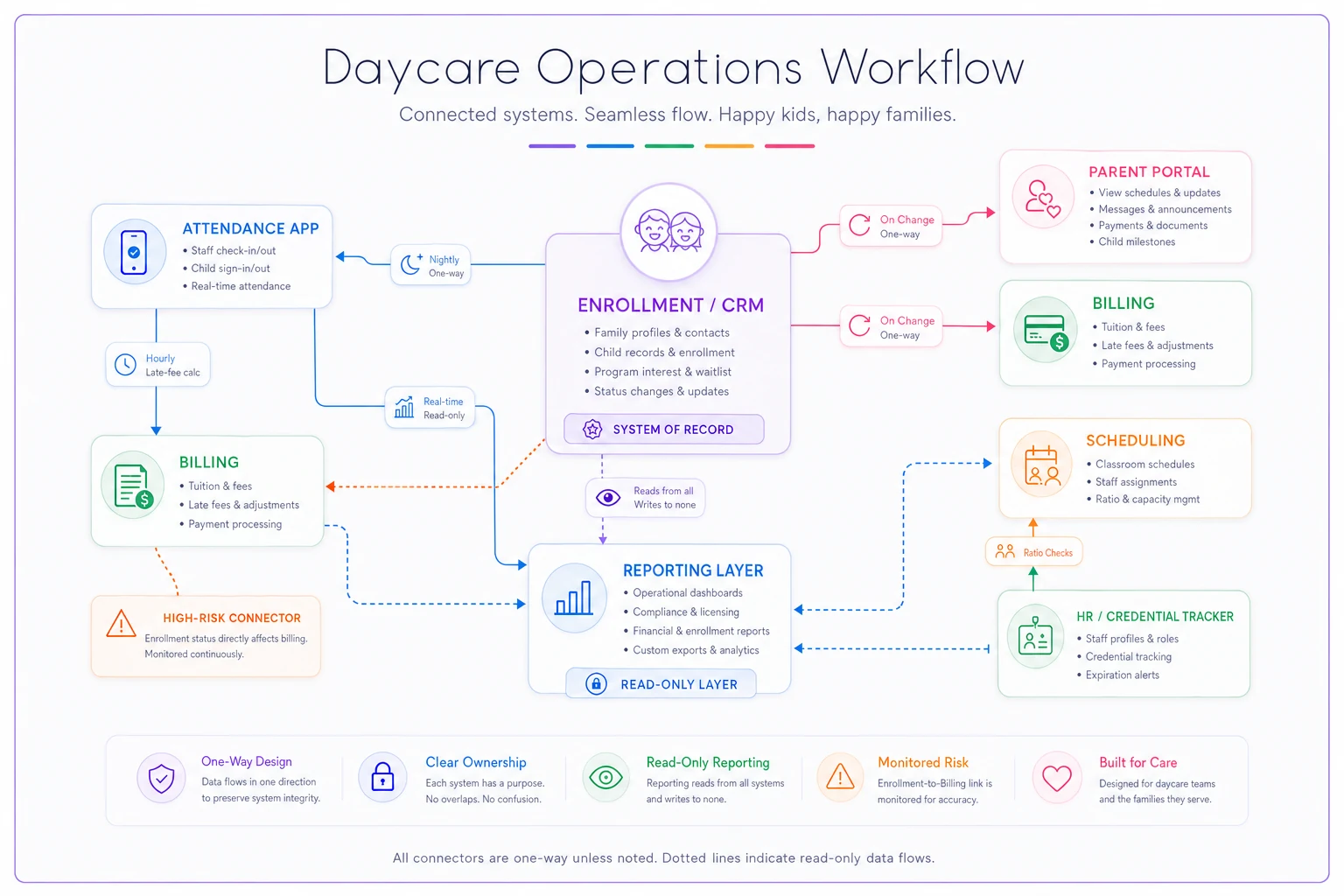
That last point is underrated. Your reporting layer should never be a system of record. The moment someone can "fix a number" in a report, you've lost the thread of where truth lives. Reporting reflects reality; it doesn't create it.
Drawing the workflow also reveals its own failure points. In the map above, the single riskiest link is enrollment status flowing to billing. If that sync lags or drops, you either keep billing a family that withdrew or stop billing one that's still enrolled. Both are the kind of error families remember. So that's the connector you monitor most closely.
Quarterly integration-health rituals
Integrations decay. A vendor changes their API, a field gets renamed, someone turns off an automation "just to test something" and forgets to turn it back on. If you only look when something breaks, you'll only find out when a parent complains — which is the worst possible detection method.
-
Pull the same record through every system. Pick one active child and one active family. Confirm the name, DOB, status, and balance match everywhere. Mismatches are your canary.
-
Check the last-sync timestamps. Every connector should show when it last ran successfully. Anything that "last ran" three weeks ago on a nightly schedule is quietly dead.
-
Run a count reconciliation. Does enrollment count in the CRM match active accounts in billing match kids in the attendance roster? Off-by-a-few is normal churn; off-by-a-lot means a sync is dropping records.
-
Re-score your top three connectors against the rubric above. Scores drift as vendors change.
-
Review error logs for the quarter. Silent failures accumulate. Skim them for patterns.
Centers that stay clean treat this like a fire drill: same checklist, someone owns it, it happens whether or not anything seems wrong. The ones that skip it end up doing a frantic full-day audit right before an inspection or a subsidy filing — exactly when they have no time for it.
A phased integration-health playbook by center size
What's right for a 40-kid single site is overkill for a three-location group. Match the effort to the scale.
Small (roughly under 60 kids, single site): Keep it minimal. One system of record, a clear one-page data map, and a semi-annual health check. Don't over-engineer connectors you don't need. Manual exports are tolerable if they're few and someone reliable owns them. The biggest risk here is one person holding all the knowledge in their head — so write the map down.
Mid-size (roughly 60–200 kids, one or two sites): This is where drift starts to hurt. Move to a proper source-of-truth table, automate the high-risk connectors (enrollment→billing, attendance→billing), and adopt the quarterly ritual. Assign an actual owner for integration health — a name, not "the office." This is also the stage where operational software that centralizes these entities under one roof stops being a nice-to-have and starts saving real hours, because the alternative is hand-reconciling counts across tools every month.
Multi-site (200+ kids, three or more locations): Now you need consistency across sites, not just within one. The same "Child" definition, the same status values, the same connector standards everywhere. One site improvising its own workaround becomes everyone's reporting problem. At this scale you want centralized monitoring of sync health across all locations and a standing review, not just a checklist someone runs when they remember.
When a big integration project is a bad idea
Not every center should be building integrations. If you're a small single site running smoothly on one platform, adding middleware and connectors just gives you more things that can break. The goal isn't maximum connectivity — it's the least plumbing that reliably delivers accurate data.
-
your data is currently accurate and one person can easily maintain it
-
you're about to switch platforms anyway (build the map first, integrate after)
-
you don't yet have anyone who can own health checks
An integration nobody monitors is worse than a manual process someone actually does.
A real scenario
A two-site center, about 140 kids total, ran billing, parent-comms, and attendance as three separate tools with no clear owner for family records. Front-desk staff at each site updated contact info wherever was convenient. Over about a year, roughly 1 in 6 family records had a mismatch somewhere — usually phone numbers or an outdated authorized-pickup list, which is a safety issue, not just an annoyance.
They didn't buy anything new at first. They just did the master-data work: declared the CRM the owner of family and child records, switched the other two tools to read-only copies with one-way nightly sync, and put a name against a quarterly health check. Within two quarters the mismatch rate dropped to near-zero. The monthly count reconciliation that used to take an afternoon of cross-checking became about a fifteen-minute glance. No dramatic revenue story — just fewer surprises, faster closes, and a front desk that finally trusted the numbers on the screen.
The point
A childcare integrations strategy isn't a technology project. It's a set of decisions about ownership: which system owns which field, which direction data flows, who checks that it's still working.
Start with the one-page master-data list. Assign a single owner to every field. Make your syncs one-way wherever you can. Score your connectors honestly, especially the manual ones you've been pretending are fine. Then put the quarterly ritual on the calendar and give it to a real person. That's the whole system — and it scales with you far better than another app ever will.
Start with the one-page master-data list. Assign a single owner to every field. Make your syncs one-way wherever you can. Score your connectors honestly, especially the manual ones you've been pretending are fine. Then put the quarterly ritual on the calendar and give it to a real person. That's the whole system — and it scales with you far better than another app ever will.
Ready to transform your daycare operations?
Join hundreds of daycare centers using Carexly to save time, improve communication, and enhance child care quality.