
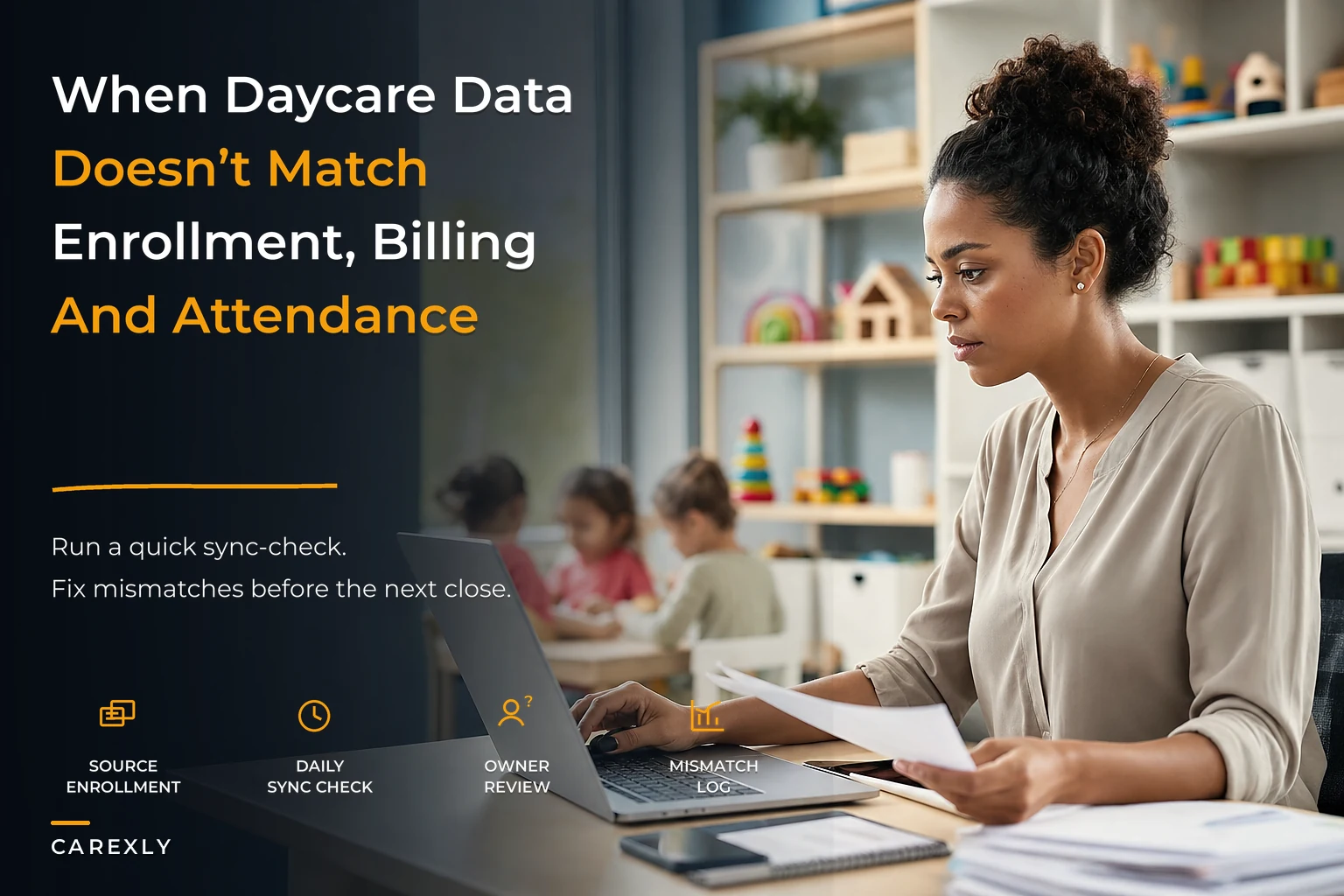

Monday morning. Your assistant director emails you that the enrollment spreadsheet shows 47 kids, but the billing system says 52. Meanwhile, the attendance app counts 44 present today, which breaks ratio because you scheduled staff based on the 52 number from billing.
This happens every week at daycares running somewhere between 35 and 80 kids. Not because anyone's incompetent—it's just that daycare data governance isn't something you learn in early childhood education programs, and most centers patch together systems as they grow.
The real mess starts when different staff members maintain different data sources. Your enrollment coordinator updates the master spreadsheet. Your billing admin works directly in the payment processor. Teachers mark attendance in the app. The assistant director keeps their own ratio tracking sheet. By Wednesday, none of these match, and you're making decisions based on whichever number looks most recent.
Why daycare data splits across systems
Centers usually start with one spreadsheet for everything. Around 25 kids, you add a payment processor. At 40, you get an attendance app for licensing compliance. By 60, you've got separate systems for enrollment, billing, attendance, staff scheduling, and parent communication.
Each system makes sense individually. The billing software handles recurring payments better than a spreadsheet. The attendance app generates state compliance reports. The scheduling tool calculates ratios automatically. But now enrollment changes need updating in five places, and nobody has time to do that perfectly every time.
It gets worse when different people own different systems. Your office manager handles billing in Tuition Express. Teachers track attendance in ProCare. You manage enrollment in Google Sheets because that's what you've always used. The assistant director built their own Excel file for scheduling because they don't have access to the main systems.
What really breaks things is timing mismatches. A family enrolls on the 15th but doesn't start until the 1st of next month. The enrollment spreadsheet shows them immediately. Billing doesn't add them until the 25th for the next month's charge. Attendance won't see them until they actually show up. For two weeks, your systems disagree about whether this child even exists in your program.
The cascade effect of mismatched data
When your attendance count doesn't match enrollment, you either overstaff—wasting $200–400 per unnecessary shift—or understaff and risk compliance violations and parent complaints.
Eliminate administrative bottlenecks.
Carexly helps you manage enrollments, attendance, and staff schedules effortlessly.
- Streamlined child enrollment
- Automated parent notifications
- Staff shift and activity scheduling
No credit card required
Revenue leaks through the gaps too. That family who withdrew last month but never got removed from billing? They'll dispute the charge, creating hours of admin work and potentially damaging your relationship with them. The part-time schedule change that got updated in enrollment but not billing? You've been undercharging for six weeks and now have an awkward conversation about back-payment ahead of you.
Staff trust erodes when numbers don't match. Teachers see 8 toddlers on their classroom list but 10 show up Monday morning. The cook preps lunch for 45 kids based on yesterday's attendance, but today 52 arrive. Your assistant director schedules based on a ratio spreadsheet showing 1:6 for preschool, while the handbook says 1:8, and state licensing actually requires 1:10.
These mismatches train your team to ignore data. They start keeping their own informal counts. Making calls based on memory instead of records. Building workarounds that make the underlying problem worse. Eventually nobody trusts any number from any system, and you're running on gut feel and post-it notes.
Parent communication suffers too. A parent asks about their balance, and the front desk quotes one number while the billing email shows another. Or you tell a waitlisted family you have an opening based on the enrollment spreadsheet, then discover billing shows that slot filled last week.
Building a single source of truth
Good daycare data governance starts with defining one authoritative source for each data type. Not one system for everything—that's usually impossible—but clear ownership of which system holds which truth.
Enrollment should live in one place that tracks current status, start date, schedule, classroom assignment, and key dates. This becomes your source for "who goes here."
Billing needs its own source that pulls from enrollment but adds payment methods, billing cycles, adjustments, and balance tracking. This owns "who owes what."
Attendance requires a system that tracks actual presence for both compliance and billing reconciliation. This defines "who was actually here."
Staff scheduling pulls from enrollment for ratios but maintains its own record of assignments, time-off, and coverage. This determines "who works when."
Here's what a basic data map looks like:
| Data Type | Source System | Update Frequency | Who Updates | Who Validates |
|---|---|---|---|---|
| Child enrollment status | Enrollment spreadsheet | Real-time | Office Manager | Director weekly |
| Classroom assignments | Enrollment spreadsheet | Real-time | Office Manager | Lead Teachers daily |
| Billing amounts | Payment processor | Weekly batch | Billing Admin | Office Manager weekly |
| Daily attendance | Attendance app | Real-time | Teachers | Office Manager daily |
| Staff schedules | Scheduling tool | Weekly | Assistant Director | Director weekly |
| Waitlist | Separate spreadsheet | Real-time | Enrollment Coordinator | Director weekly |
The critical piece is the validation column. Someone needs to verify that downstream systems actually match the source. When enrollment changes, billing must update within 48 hours. When attendance patterns shift, scheduling needs adjustment by Friday for next week.
Lightweight sync checks that prevent drift
ETL—Extract, Transform, Load—sounds complex, but for daycare data governance it just means regular checks confirming your systems agree. You're not building data warehouses here. You're just making sure Tuesday's enrollment change shows up in Wednesday's billing run.
Start with a daily sync check that takes about 10 minutes:
-
Pull today's enrollment count from your source
-
Compare to attendance system capacity
-
Compare to billing system active accounts
-
Flag any mismatches for investigation
The key is catching mismatches fast. A one-day difference is usually a simple fix—someone forgot to update one system. A two-week drift requires actual detective work to figure out what changed and when.
Create specific reconciliation points:
-
Monday morning
Attendance system vs enrollment for the week
-
Wednesday afternoon
Billing system vs enrollment for next month's charges
-
Friday morning
Staff schedule vs projected enrollment for next week
Build a simple tracking sheet for these checks:
-
Week of [Date]
-
□ Monday
Attendance count matches enrollment (Y/N: ___)
-
If N
Discrepancy: Resolved by:
-
□ Wednesday
Billing count matches enrollment (Y/N: ___)
-
If N
Discrepancy: Resolved by:
-
□ Friday
Schedule ratios match enrollment (Y/N: ___)
-
If N
Discrepancy: Resolved by:
The goal isn't perfection—it's catching problems before they compound. That enrollment change that didn't make it to billing? Catch it Wednesday, not when the parent complains next month. The withdrawal that didn't update attendance capacity? Find it Monday, not when you're scrambling to fix ratios mid-morning.
Automate a short daily email that lists flagged mismatches so the office manager sees them first thing.
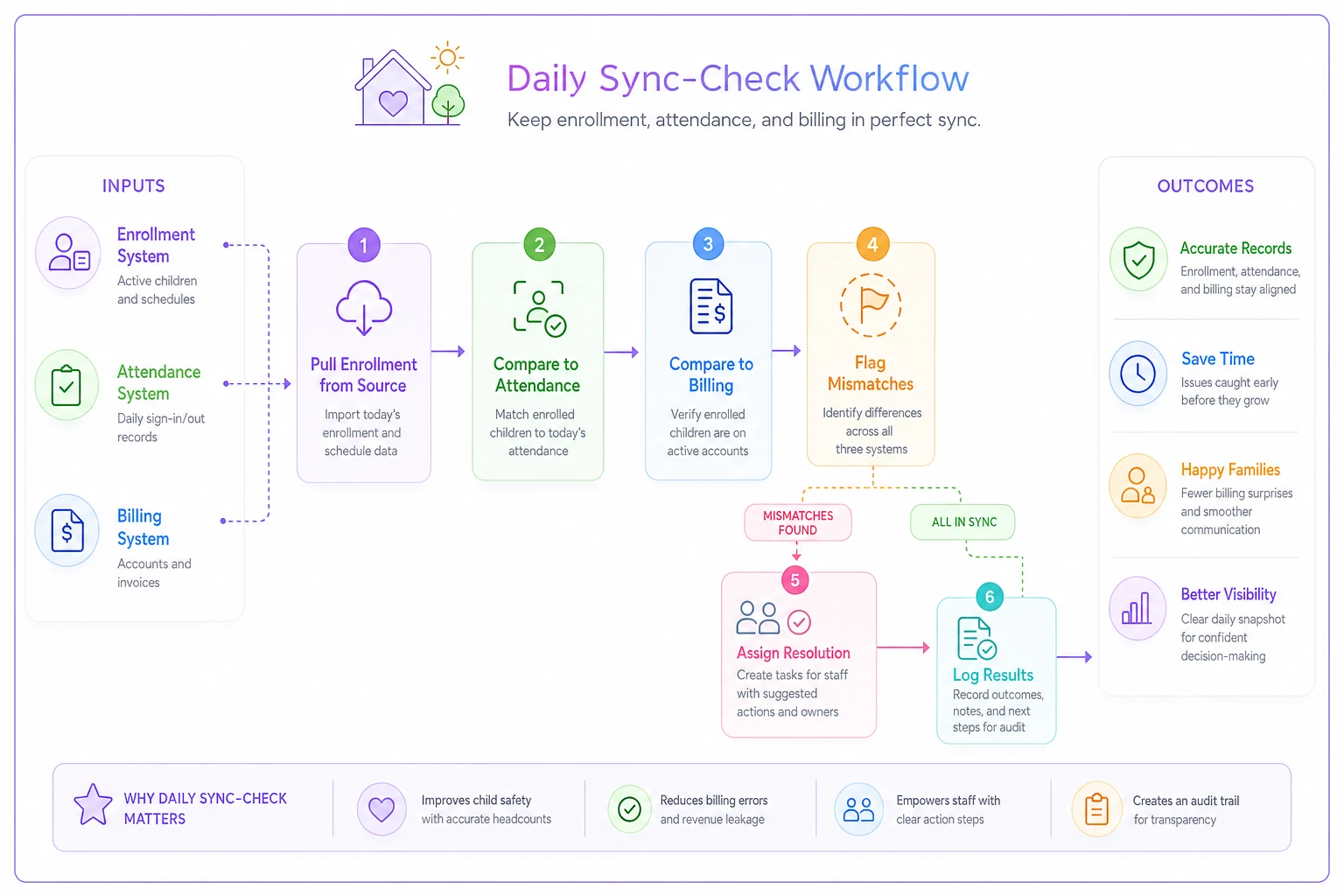
A quick visual like this helps new staff understand the daily cadence.
Role-based dashboards that prevent information chaos
Different roles need different data views. The director needs enrollment trends and revenue summaries. Teachers need their classroom roster and ratio status. The billing admin needs payment statuses and adjustment histories. When everyone sees everything, nobody knows what actually matters.
Director Dashboard (weekly view):
-
Total enrolled by age group vs capacity
-
Current waitlist depth by age
-
Revenue collected vs projected
-
Staff coverage percentage for next week
-
Any system mismatches flagged this week
Classroom Lead Dashboard (daily view):
-
Today's roster with photos
-
Special instructions (allergies, custody, early pickup)
-
Current ratio status
-
Tomorrow's expected attendance
-
Missing documentation flags
Office Manager Dashboard (daily operational):
-
Today's attendance vs enrolled
-
Pending enrollment paperwork
-
This week's billing exceptions
-
Tour schedule for the week
-
Parent communication log
Billing Admin Dashboard (focused on money):
-
Accounts requiring updates from enrollment
-
Failed payment retry schedule
-
Credit balances requiring refunds
-
Next month's billing preview
-
Adjustment audit trail
Keep these simple enough that people actually use them. A complex dashboard nobody checks is worse than no dashboard at all. Start with the 3–5 numbers each role genuinely needs daily, then add more only when someone asks for it.
The weekly review that catches problems early
Consistent review rhythm matters more than the tools you use. Not a painful hour-long meeting—a focused 20-minute check that keeps small mismatches from becoming bigger ones.
Every Friday at 2pm (or whatever time actually works), the director and office manager run through:
-
The Count Check (3 minutes) - Enrollment total in source system: __ - Billing system active accounts: _ - Attendance system capacity: __ - Match? If no, assign who investigates
-
Next Week's Pressure Points (5 minutes) - New starts beginning Monday - Withdrawals processing - Schedule changes taking effect - Have all systems been updated? Check each.
-
The Money Match (4 minutes) - This month's projected revenue: __ - Actual collected so far: _ - Outstanding balances over 30 days: __ - Any billing/enrollment mismatches found this week?
-
Operational Flags (5 minutes) - Any classroom over ratio next week? - Any waitlist families waiting over 30 days? - Any data disputes from parents? - Any system access issues reported?
-
Fix Assignment (3 minutes) - What broke this week? - Who fixes what by when? - What prevents this next time?
Document the review in a simple log:
-
Date
___
-
Attendees
___
-
Systems matched
Y/N
-
Issues found
___
-
Actions assigned
___
-
Next review
___
The value isn't catching every problem—it's creating accountability. When people know there's a weekly review, they update systems more carefully. When issues get caught weekly instead of monthly, they stay manageable.
Sample sync-check checklist for Monday operations
Monday mornings set the tone for the whole week. Here's a checklist that takes 15–20 minutes but prevents hours of confusion later:
Before 8 AM (Pre-Opening)
-
□ Attendance System Check - Load today's expected roster - Compare count to Friday's enrollment - Flag any new names not in system - Note any withdrawals still showing - Verify classroom assignments match current
-
□ Ratio Verification - Pull staff schedule for today - Calculate ratios by classroom using attendance roster - Flag any rooms at risk if all enrolled show - Identify flex coverage if needed
-
□ Billing Alert Check - Review any weekend payment failures - Check for Monday start dates not yet in billing - Flag accounts 30+ days overdue for follow-up
By 10 AM (After Morning Rush)
-
□ Actual vs Expected - Compare actual attendance to projection - Update afternoon staff if ratios allow reduction - Note any unexpected absences for patterns
-
□ Documentation Gaps - Review new starts for missing paperwork - Check expiring documents (physicals, immunizations) - Flag for parent communication today
-
□ System Updates - Enter any weekend enrollment changes - Process any withdrawal notifications received - Update emergency contacts from weekend requests
Before Lunch (11:30 AM)
-
□ Kitchen Count Confirmation - Confirm lunch count with actual attendance - Adjust tomorrow's order if a pattern is emerging - Note any new dietary restrictions
-
□ Afternoon Staffing Adjustment - Confirm afternoon coverage based on morning attendance - Adjust if several children are leaving early - Communicate changes to affected staff
This checklist works because it's tied to natural operational rhythms—you're checking data when you actually need it for a decision, not as a separate administrative task tacked onto everything else.
Where automation helps (and where it doesn't)
AI-powered operational software changes daycare data governance from a constant struggle into something closer to a background process. Instead of manually checking whether enrollment matches billing, automated sync checks run on a schedule and flag mismatches immediately. Rather than updating five systems when a family withdraws, one update triggers coordinated changes across all platforms.
The real value shows up in pattern recognition. When three families reduce from full-time to part-time in the same month, the system flags a potential trend worth investigating. When attendance consistently runs lower on Fridays, it suggests a staffing adjustment. When billing disputes cluster around specific fee types, it points to a communication gap somewhere.
But automation can't replace human judgment about data quality. A system can flag that billing shows 52 kids while enrollment shows 47, but only you know that five families are in a transition window between enrollment and start date. The software can alert you that attendance is trending down, but you understand it's spring break week.
The sweet spot is automating the checking and flagging while keeping humans in charge of investigation and resolution. Let the system monitor for mismatches regularly. Have it alert you when patterns emerge. Use it to generate your Friday review reports automatically. But keep the actual decision-making in human hands.
For centers running 40–80 kids, that balance typically looks like:
-
Automated daily sync checks between systems
-
Alert notifications for mismatches over threshold amounts
-
Weekly report generation for the review meeting
-
Triggered workflows when specific changes occur
-
Audit trails showing what changed and when
This frees up several hours weekly that used to go toward manual checking and updating, letting your admin staff focus on families instead of spreadsheets.
Common governance failures to avoid
The "We'll Clean It Up Later" Trap: Centers often think they'll fix data problems when things slow down. But childcare never really slows down, and meanwhile the mismatches compound. That family who withdrew but stayed in billing becomes a disputed charge. The enrollment that didn't update attendance becomes a ratio violation. Fix mismatches within 48 hours or they become exponentially harder to untangle.
Over-Trusting Single Staff Members: When only one person understands how your data systems connect, you're vulnerable. They get sick, take vacation, or leave for another job, and suddenly nobody knows why billing doesn't match enrollment. Document your data flow. Train at least two people on each critical system. Write simple guides showing what updates where.
The "Close Enough" Mentality: Maybe enrollment shows 47 and billing shows 45—close enough, right? But those two missing accounts could represent $3,000 in monthly revenue. Or they could be withdrawn families still being charged, headed toward disputes and a damaged reputation. Small gaps matter.
System Creep Without Governance: Adding new software without thinking through how it fits your data flow creates new confusion. That parent communication app seems helpful until you realize it maintains its own contact database that doesn't sync with enrollment. Before adding any new system, map out what data it needs, where that data comes from, and how updates will flow.
Ignoring Historical Data: Centers often focus entirely on current data while losing historical patterns. Knowing that enrollment drops around 10% in August helps you staff correctly. Understanding that a significant chunk of January enrollments withdraw by March prevents overcommitting. Keep at least rolling 12-month histories of key metrics, even if it's just a simple spreadsheet.
Making peace with imperfect systems
Perfect daycare data governance doesn't exist at the 40–80 kid scale. You're not running enough volume to justify enterprise systems, but you're too big for spreadsheets alone. The goal is "good enough to trust for decisions."
That means accepting some realities. Your systems won't integrate perfectly. You'll occasionally have mismatches. Someone will sometimes forget to update something. Build your processes assuming these failures, not pretending they won't happen.
Focus on speed of detection and correction rather than trying to prevent every error through complex procedures. It's better to catch and fix five mismatches weekly than to spend hours on prevention systems nobody actually follows.
Keep your governance rules simple enough that part-time staff can follow them. If your data update process requires 15 steps and three approvals, it won't happen consistently. Three bulletproof rules everyone follows will outperform 20 detailed procedures everyone quietly ignores.
Daycare data governance should serve operations, not the other way around. If your teachers spend more time updating systems than teaching, you've over-engineered it. If your office manager can't answer basic questions without checking four systems, you've under-integrated. Find the balance that gives you reliable enough data for good decisions without drowning in administrative overhead.
The centers that get this right aren't the ones with perfect systems. They're the ones with clear ownership, consistent review rhythms, and quick correction processes. They know their data won't always agree perfectly, but they also know they'll catch disagreements before those disagreements cause real problems.
Start with the Friday review meeting. Add the Monday morning checklist. Define who owns what data. Build from there based on what breaks most often in your specific operation. Within a month, you'll trust your numbers again. Within three months, data mismatches become rare enough that people notice and fix them without being asked.
Your enrollment might still live in a spreadsheet while billing uses dedicated software. But at least when someone asks how many kids you have, everyone gives the same answer.
Ready to transform your daycare operations?
Join hundreds of daycare centers using Carexly to save time, improve communication, and enhance child care quality.