

Switching childcare software looks simple in a sales demo and then quietly eats three months of your life. The demo shows clean dashboards. What it doesn't show is what happens when you export four years of attendance records, family contact info, immunization dates, and half-finished payment plans — and try to drop all of that into a system that organizes everything slightly differently than your old one did.
Most migration horror stories aren't caused by bad software. They're caused by a missing plan. Nobody decided when the old system stops being the source of truth. Nobody wrote down what "done" looks like. And nobody agreed, in advance, on what would make everyone say "stop, roll it back, we go live next month instead."
This is a vendor-agnostic playbook. It doesn't matter if you're moving from spreadsheets to a real platform, or jumping between two established childcare products. The mechanics are the same: map your data honestly, cut over in phases, keep a rollback path open until you're sure, and score your integrations before you trust them with real money.
Why migrations break more often at small centers than large ones
Big chains have IT staff and project managers. A single-site center with 80 kids has a director who's also covering the toddler room when someone calls in sick. That's the real reason small-center migrations go sideways — not a lack of technical skill, but a lack of dedicated time and a habit of doing the migration "in the background" while still running the center full-time.
-
The old data is messier than anyone admits. Duplicate family records, a kid enrolled twice under two spellings, an ex-employee still listed as an emergency contact. Migrations expose every shortcut you've taken over the years.
-
Billing is treated as an afterthought. People migrate rosters carefully, then discover mid-cycle that recurring tuition charges didn't carry over and three families weren't billed.
-
Two systems run "temporarily" for six months. Staff enter attendance in both because nobody committed to a switch date. Now the data disagrees with itself — the kind of expensive mess covered in when your daycare data disagrees.
At scale, these problems compound. One duplicate family record in an 80-child center is a five-minute fix. The same duplication rate across a 300-child multi-site operation becomes hours of reconciliation and a subsidy report that won't balance.
Start with a data inventory, not a feature comparison
Before you touch a cutover plan, you need to know exactly what you're moving. Most centers skip this and pay for it later. Sit down and list every category of data living in your current system — where it lives, how clean it is, and how bad it is if something breaks.
Eliminate administrative bottlenecks.
Carexly helps you manage enrollments, attendance, and staff schedules effortlessly.
- Streamlined child enrollment
- Automated parent notifications
- Staff shift and activity scheduling
No credit card required
Here's a simplified version of the data-mapping table every center should build before migrating:
| Data category | Source field example | Target field | Cleanliness | Criticality | Migration method |
|---|---|---|---|---|---|
| Family/guardian records | Parent_Name, Phone1 | Guardian profile | Medium (dupes likely) | High | Manual review + import |
| Child enrollment | ChildID, Room, StartDate | Enrollment record | High | High | Bulk import |
| Immunization/health | Immun_Date, Allergies | Health record | Low (free text) | Critical | Manual cleanup first |
| Recurring tuition plans | Plan_Amount, Frequency | Billing plan | Medium | Critical | Rebuild manually |
| Historical attendance | Date, Check_In/Out | Attendance log | High | Medium | Archive or partial import |
| Staff records + credentials | Cert_Type, Expiry | Staff profile | Low | High | Manual review |
| Outstanding balances | Balance_Due | Account ledger | Medium | Critical | Reconcile at cutover |
The two columns that matter most are cleanliness and criticality. Anything that's both critical and messy — health records, tuition plans, outstanding balances — is where your prep time goes. Historical attendance from three years ago usually isn't worth migrating live; export it to a PDF archive and move on.
Budget more time for cleaning data than for moving it.
A realistic rule of thumb: budget more time for cleaning data than for moving it. In practice, the actual import takes a few hours. The cleanup before it is where the weeks disappear.
The phased cutover plan
The mistake almost everyone makes is treating go-live as a single event — flip the switch Monday morning and hope. A phased cutover spreads the risk so that if something breaks, it breaks in a contained area you can fix before it touches families or money.
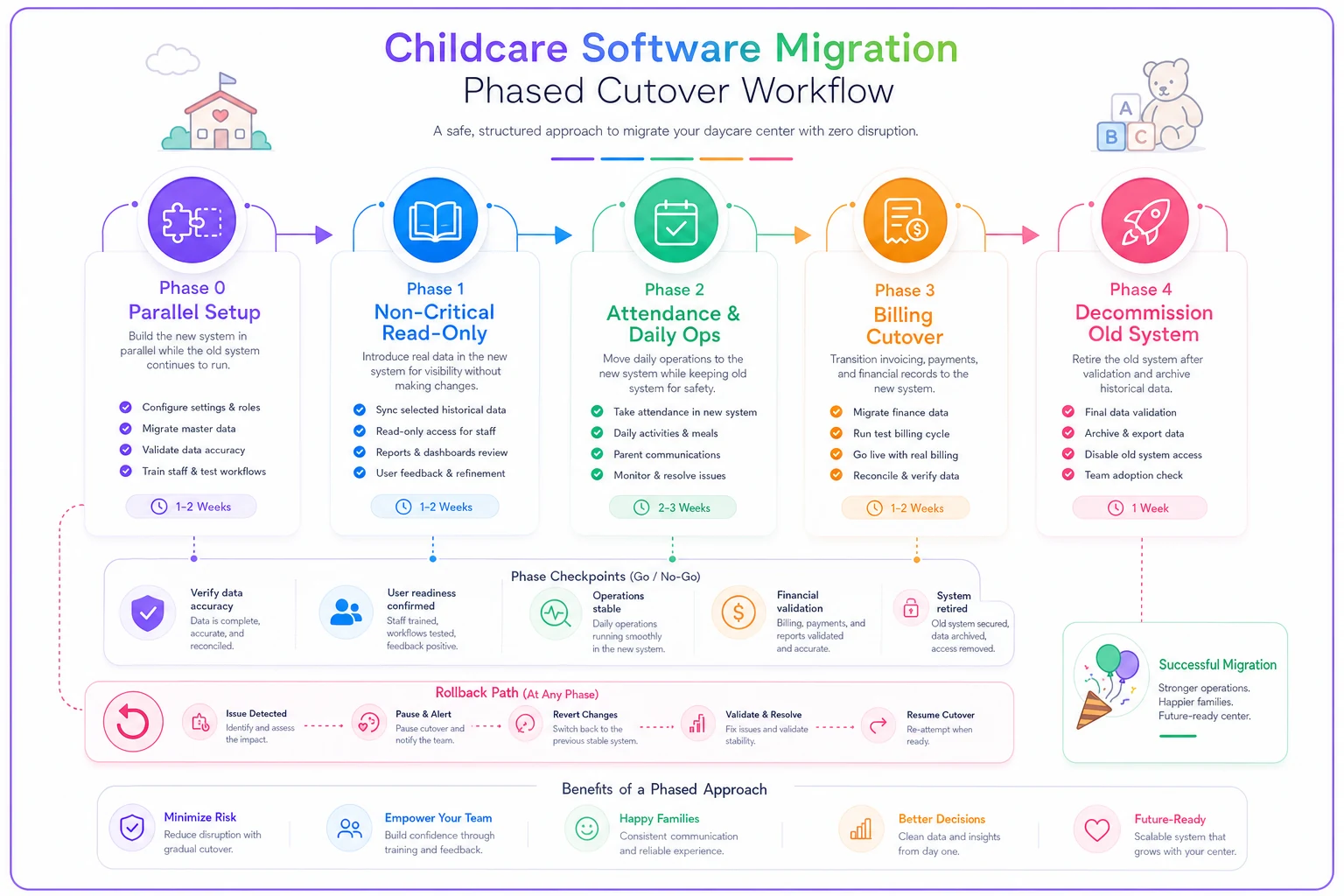
Visualize the phased sequence as a stepwise workflow to keep responsibilities and rollback points clear.
-
Phase 0 — Parallel setup (2–4 weeks before). Build the new system in the background. Import cleaned family and enrollment data. Nobody uses it for daily operations yet. This is your sandbox to catch mapping errors.
-
Phase 1 — Non-critical read-only. Turn on the parts that can't hurt you: staff viewing rosters, browsing child profiles. No billing, no attendance yet. Staff get comfortable clicking around.
-
Phase 2 — Attendance and daily operations. Move check-in/check-out to the new system. Keep the old one accessible but read-only. This is the first time real daily data flows in — watch it closely for a full week.
-
Phase 3 — Billing cutover. The scariest phase. Do this at the start of a billing cycle, never mid-cycle. Verify every recurring plan, every discount, every subsidy arrangement before the first automated charge runs.
-
Phase 4 — Decommission. Only after two clean billing cycles and no rollback triggers. Export final archives from the old system, then shut it off.
Billing comes last and gets its own phase deliberately. Tuition and payroll are where migration mistakes turn into real financial damage — the same reason careful export templates matter so much, which is worth reviewing alongside payroll error prevention before you touch any timekeeping data.
Rollback criteria: decide before you're panicking
The most valuable thing you can do is write down, in advance, the exact conditions under which you abandon the new system and revert to the old one. When something goes wrong at 7 a.m. during drop-off, nobody's brain is working well enough to make that call fairly. So make it now, while things are calm.
-
Attendance data fails to save or sync for more than one full day with no fix in sight.
-
More than ~5% of families report they can't log in or see the wrong child.
-
Any billing run produces incorrect charges to real families that can't be corrected before money moves.
-
Immunization or allergy data displays incorrectly for any child — this one is zero-tolerance.
-
Staff can't complete check-in during peak drop-off, forcing paper backup two days in a row.
A rollback isn't failure. It's the plan working. A center that reverts, fixes the mapping error, and goes live cleanly three weeks later is in far better shape than one that pushed through a broken cutover because they'd already announced the date.
Keep the old system in a recoverable state — not deleted, not overwritten — until you've cleared every rollback trigger for two consecutive billing cycles.
Integration scorecards: don't trust a connection until it earns it
Your childcare platform rarely lives alone. It talks to payment processors, accounting software, sometimes payroll, sometimes state subsidy portals. Each of those connections is a potential failure point, and each one deserves to be tested and scored before you rely on it with real data.
A simple integration scorecard for each connection:
| Integration | Test transaction passed? | Error handling? | Sync frequency | Owner | Score (1–5) |
|---|---|---|---|---|---|
| Payment processor | Yes — $1 test charge | Yes, retries | Real-time | Director | 5 |
| Accounting export | Partial — needs mapping | Manual only | Daily | Bookkeeper | 3 |
| Subsidy portal | Not tested yet | Unknown | Weekly | Admin | 1 |
Any integration scoring below a 3 does not go live carrying real data. A subsidy portal connection you haven't tested isn't a feature — it's a liability waiting for an audit. Score honestly, and treat low scores as blockers, not warnings.
The pattern to watch for: vendors will tell you an integration "just works." In practice, that usually means it works for the common case and silently drops the edge cases — the family with two payment methods, the subsidy that covers 60% not 100%, the mid-month enrollment. Test the edge cases. Those are the ones that generate angry phone calls.
The runbook: who does what, in what order, with what fallback
A runbook is the boring document that saves the migration. It's a step-by-step script for cutover day and the days around it, written so that if the director is out sick, someone else can follow it exactly.
Your minimum runbook checklist:
-
[ ] Cutover date and time confirmed, communicated to all staff and families 2 weeks out
-
[ ] Data backup of old system completed and verified the night before
-
[ ] Named owner for each phase, plus a named backup person
-
[ ] Paper fallback forms printed for attendance in case of outage
-
[ ] Test check-in/check-out completed by two staff before doors open
-
[ ] Billing plans spot-checked against a sample of 10 family accounts
-
[ ] Rollback trigger list posted where the front desk can see it
-
[ ] Support contact for the new vendor confirmed reachable during cutover window
-
[ ] End-of-day verification
attendance counts match physical headcount
The runbook is also where AI-assisted platforms quietly earn their keep during a migration. A system that automatically flags duplicate family records, catches immunization dates that didn't parse correctly, or reconciles attendance counts against expected ratios takes a big chunk of manual verification off your plate. It doesn't replace the runbook — it just means fewer checklist items require someone squinting at a spreadsheet at 6 a.m. Either way, the goal is the same: reduce how much a tired human has to catch by hand.
A real scenario: an 85-child center switching mid-year
A center with roughly 85 kids and 14 staff decided to move off a patchwork of spreadsheets and a legacy billing tool. Their first instinct was a single weekend cutover — export Friday, import Saturday, live Monday.
The data inventory killed that plan. They found around 30 duplicate or outdated family records and a batch of immunization dates stored as free text ("got shots in spring") that no import tool could parse. Recurring tuition plans lived in a separate spreadsheet nobody had touched in months.
Instead, they ran the phased approach over about six weeks. Phase 0 cleanup took the most time — roughly two weeks of an admin working a few hours a day. When they hit the billing phase, the integration scorecard caught something: three families on split-payment subsidy arrangements weren't mapping correctly. Under the original "go live Monday" plan, those families would have been mis-billed on day one.
Because they'd defined a rollback trigger for billing errors, they paused Phase 3 for four days, fixed the mapping, and reran the test. The first live billing cycle went out clean. No family got an incorrect charge. Total staff overtime for the whole migration came in well under what they'd expected — mostly because nobody spent a weekend firefighting a broken cutover.
When a phased migration is overkill
Not every center needs all five phases. If you're brand new with 20 kids and clean data entered last month, a phased cutover is overhead you don't need — do the setup, verify billing, and go. The phased approach earns its complexity when you have years of accumulated data, active recurring billing, subsidy arrangements, and enough families that a bad cutover generates real phone volume.
Where it becomes non-negotiable: multi-site operations, centers with heavy subsidy dependence, and anyone carrying outstanding balances into the switch. In those situations, skipping phases isn't saving time — it's borrowing trouble at interest. The one thing every center should keep regardless of size is the rollback discipline and the data inventory. Even a small center benefits from knowing exactly what data it has and having decided in advance what "too broken to continue" actually looks like.
The through-line
A migration is really a test of how well you understand your own operation. The centers that struggle aren't the ones with complex software — they're the ones who never took an honest look at their messy data, never committed to a cutover date, and never decided what would make them stop.
Move your data deliberately. Cut over in phases. Keep the escape hatch open until you're genuinely sure. And write the boring runbook, because the boring runbook is the thing that lets you migrate without families or staff ever noticing anything changed — which is exactly the outcome you want.
A migration is really a test of how well you understand your own operation. The centers that struggle aren't the ones with complex software — they're the ones who never took an honest look at their messy data, never committed to a cutover date, and never decided what would make them stop.
Move your data deliberately. Cut over in phases. Keep the escape hatch open until you're genuinely sure. And write the boring runbook, because the boring runbook is the thing that lets you migrate without families or staff ever noticing anything changed — which is exactly the outcome you want.
Ready to transform your daycare operations?
Join hundreds of daycare centers using Carexly to save time, improve communication, and enhance child care quality.