

Childcare centers sit on some of the most sensitive data a small business can hold. Pediatrician names, custody arrangements, allergy and medication records, immunization status, parent work schedules, home addresses, and sometimes income documentation for subsidy eligibility. Most centers collect all of it on day one of enrollment and then never think about it again until something goes wrong.
The problem isn't that directors don't care. It's that privacy gets treated as a one-time form instead of an ongoing operational system. Consent gets captured once, stored in a paper folder or a shared drive, and left there for years — long after the reason for collecting it has expired. Nobody tracks who has access. Nobody knows when records should be deleted. And when a laptop goes missing or a staff member forwards a class roster to a personal email, the center has no runbook and no real sense of how exposed it actually is.
This is a systems article, not a compliance lecture. The goal is to show how consent capture, access controls, retention, and breach response all connect — and what breaks when you treat them as separate tasks instead of one workflow.
Why childcare data privacy breaks down differently than other businesses
Most privacy advice online is written for e-commerce or SaaS companies. It assumes you have engineers, a cookie banner, and a privacy officer. Childcare centers have none of that, and the data problems look completely different.
A typical center looks like this: a family enrolls, the intake packet asks for everything at once — emergency contacts, medical history, photo release, authorized pickup list, subsidy paperwork — the director collects it, files it, and moves on. Six months later the family's custody situation changes, the photo-release decision reverses, or the pickup list is outdated. But the original consent is still sitting in the file as if nothing changed.
The core issue with childcare data privacy consent is that consent isn't static, but centers treat it like it is. A parent who agreed to photos on social media in September might feel very differently after a divorce in March. A pickup authorization from last year might now include someone with a restraining order. Consent that isn't revisited isn't really consent anymore — it's just an old signature.
The breakdown also gets worse with scale. A single-classroom home daycare can hold most of this in one person's head. A three-location center with 180 families and 40 staff cannot. The moment information lives in multiple places — a paper file, a billing system, a messaging app, a teacher's phone — you've lost the ability to answer basic questions like "who can see this child's medical record?" or "did we ever get updated consent after the family's situation changed?"
The four systems that actually matter
Privacy at a center isn't one thing. It's four connected systems that most directors run informally and inconsistently. When any one of them fails, the others usually fail too.
Eliminate administrative bottlenecks.
Carexly helps you manage enrollments, attendance, and staff schedules effortlessly.
- Streamlined child enrollment
- Automated parent notifications
- Staff shift and activity scheduling
No credit card required
| System | What it controls | Common failure point |
|---|---|---|
| Intake consent capture | What you're allowed to collect and use | Collecting everything "just in case," bundling unrelated consents into one checkbox |
| Reconsent triggers | Keeping consent current as situations change | No trigger exists, so consent is never revisited |
| Access & technical controls | Who can see what, and whether data is recoverable | Shared logins, no MFA, no backups |
| Retention & deletion | How long you keep data and when you destroy it | Keeping everything forever because deleting feels risky |
These are not four separate projects. They're one loop. Consent defines what you hold, access controls protect it, retention schedules decide when it leaves, and reconsent keeps the whole thing honest over time. Treat them separately and you'll end up with a center that technically has consent forms but can't actually tell you what it's holding or why.
The diagram below shows how the four systems form a continuous operational loop for a childcare center.
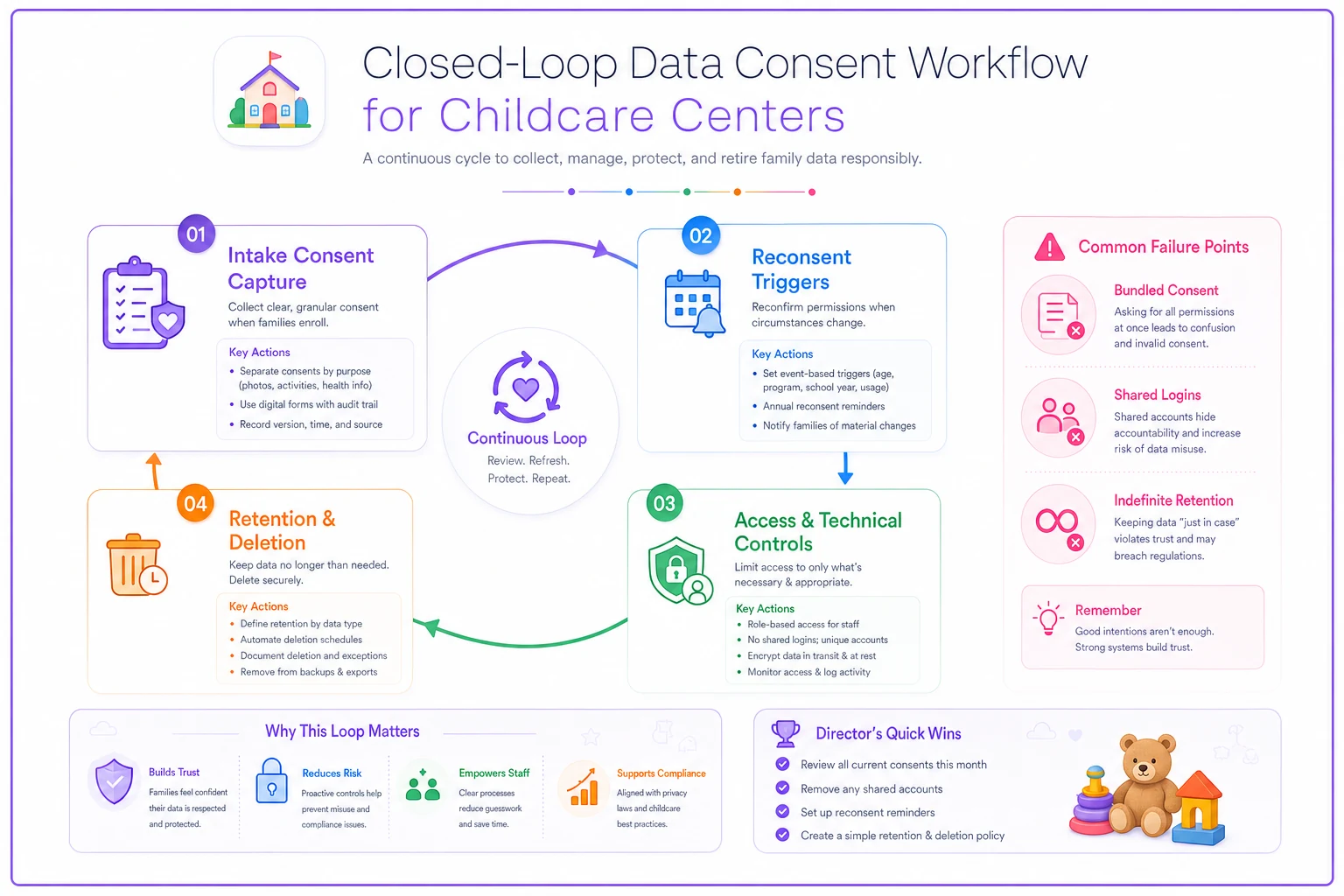
Think of this as the playback of the operational loop: each step feeds the next and the loop is what keeps privacy manageable at scale.
Intake consent: collect less, separate more
The single biggest mistake at intake is bundling. A center hands a family one giant form with one signature line — covering medical treatment authorization, photo release for marketing, data sharing with subsidy agencies, and third-party app enrollment all at once. That's convenient, but it's bad consent, because the parent can't say yes to emergency medical care while saying no to having their kid's face on Instagram.
-
Operational consent — emergency medical treatment, attendance records, billing. Non-negotiable to enroll.
-
Optional-use consent — marketing photos, social media, newsletter features. Must be separately granted and separately revocable.
-
Third-party sharing consent — subsidy agencies, health departments, your management software vendor.
-
Authorized pickup list — treated as living data, not a one-time signature.
A typical scenario: a center switches from one combined release to four separate consent items and immediately finds that a quarter of families who "agreed to photos" only wanted internal classroom app photos, not public marketing. That's not a legal technicality — it's the difference between a trusting parent and an angry one who finds their child on a Facebook ad.
The operational insight here is that minimal collection makes everything downstream easier. The less you collect, the less you have to protect, back up, and eventually delete. If you don't have a concrete operational reason to store a parent's employer address, don't collect it. Every field you add is a field you're now responsible for.
Reconsent triggers: the system almost nobody has
This is what separates a center that looks compliant from one that actually is. Consent decays. The question is whether you have triggers that catch that decay before it becomes a problem.
-
Annual re-enrollment — review photo, data-sharing, and pickup consents every year as part of the re-enrollment packet. You're already collecting updated info; attach consent review to it.
-
Reported custody or guardianship change — when a family notifies you of a custody change, the pickup list and emergency contacts get an immediate forced review, not a "we'll update it later."
-
Vendor or software change — if you switch management platforms or add a new third-party tool, families with third-party-sharing consent need to be notified and re-consented.
-
Policy change — if you change how you use photos or data, old consent doesn't carry forward automatically.
-
Age or program transition — a child moving from infant to toddler rooms is a natural checkpoint to refresh records.
Centers with zero triggers aren't collecting bad consent on purpose — they just have no moment in their calendar where consent gets looked at again. Tying reconsent to re-enrollment solves most of this in one move, because it folds privacy into a workflow that already runs once a year.
A short note on custody situations specifically: these are where consent failures turn into genuine safety incidents, not just paperwork problems. A pickup list that doesn't reflect a current court order is the kind of mistake that ends up in a news story. Any custody change should hard-trigger a same-day update, and that update should be the responsibility of a named role, not "whoever opens the email."
Minimal technical controls that don't require IT
Directors hear "technical controls" and assume they need a security consultant. You don't. You need three things done consistently, and all of them are within reach of a non-technical operator.
Multi-factor authentication on everything that holds family data. Your email, your management software, your cloud storage. This is the highest-leverage control you can implement, and it takes about ten minutes per account. Most breaches at small centers aren't sophisticated hacks — they're a reused password from a breach somewhere else, and MFA stops that cold.
Role-based access instead of shared logins. The most common technical failure at centers is one admin login that everybody uses. When everyone is "admin," nobody is accountable, and you can't answer who saw what. Teachers should see their own classroom's data. Front-desk staff should see attendance and pickup, not subsidy income documents. A departing employee's access should be revocable without changing a password that eight other people also know.
Backups you've actually tested. Family records that exist in exactly one place — one laptop, one filing cabinet, one un-backed-up drive — are one spilled coffee away from gone. This connects directly to broader continuity planning, and if you haven't worked through recovery targets, the small-center data backup plan with RTO/RPO targets and quick-recovery runbooks covers how to think about what you can afford to lose and how fast you need it back.
Roll out MFA to director and front-desk accounts first to reduce lockout risk during implementation.
-
[ ] MFA enabled on email, management software, and cloud storage
-
[ ] Shared/generic logins eliminated; every staff member has their own account
-
[ ] Access levels mapped to roles (who sees medical, financial, pickup data)
-
[ ] Offboarding step that removes access the day someone leaves
-
[ ] Automatic backups running and a test restore done at least once
-
[ ] Paper records in a locked cabinet with a short access list
-
[ ] A written list of every tool and vendor that holds family data
That last item matters more than people expect. You cannot protect data you've forgotten you're storing. Most centers can't produce a complete list of where family information actually lives, and that gap is where breaches hide.
Retention schedules: the courage to delete
Centers hoard data because deleting feels dangerous. So files pile up — former families from six years ago, old subsidy documents, incident records with no review date. Every one of those is risk you're carrying for no operational benefit.
A retention schedule is a documented decision about how long each type of record lives and what happens when that time is up. It should be driven by your state's licensing requirements first — many specify minimums for attendance, incident, and medical records — and by operational need second. Beyond those minimums, keeping data is a liability, not an asset.
| Record type | Typical retention | Trigger for deletion |
|---|---|---|
| Active enrollment records | Duration of enrollment + state minimum | Family exits + retention period elapses |
| Incident/injury reports | State-mandated minimum (often several years) | Scheduled review date |
| Immunization records | While enrolled + minimum | Exit + retention period |
| Marketing photos/media | Until consent withdrawn or child exits | Consent withdrawal or exit |
| Subsidy/income documents | Per agency requirement | Program exit + required hold |
| Former-family contact data | Short, defined window | Defined window elapses |
What most directors miss: retention and consent are the same conversation. If a parent withdraws photo consent, retention tells you to actually delete the photos — not just stop using them. If a family exits, retention tells you when their file should be destroyed, which closes the loop that intake opened. A center that keeps everything forever has effectively made every past family a permanent part of its risk surface.
This also ties into data consistency. When the same family's record lives in three systems, deletion has to happen in all three, or you've got a ghost record your official retention schedule says shouldn't exist. Getting records into one authoritative place first makes retention actually enforceable — the governance habits in single-source governance and reporting cadence are the foundation that makes clean deletion possible.
The breach-response runbook
Most centers' breach plan is panic. A laptop goes missing, a staff member emails a roster to the wrong parent, a phishing email gets clicked — and the response is improvised, slow, and usually makes the situation worse. A runbook replaces panic with a sequence.
-
Contain. Stop the bleeding. Change passwords, disable the compromised account, recover or remotely wipe the lost device, pull the misdirected email if possible.
-
Assess scope. What data was exposed, whose, and how much? This is where your list of where data lives pays off — you can't assess scope if you don't know what you hold.
-
Document the timeline. When it happened, when you found out, what you did and when. Write it down as you go, not from memory later.
-
Notify per obligation. Many states and subsidy programs have specific breach-notification requirements and timelines. Know yours before you need them. Affected families should hear it from you, clearly and early, not through rumor.
-
Remediate and review. Fix the root cause — not just the symptom — and update the control that failed so the same gap doesn't reopen.
Worth internalizing: breaches are rarely dramatic. The common ones are a misdirected email, a lost phone with the parent app still logged in, or a departed employee who still had access. Your runbook should assume the boring breach, because that's the one you'll actually face.
A real scenario
A two-location center with around 140 families was running on shared logins, a combined consent form, and no retention schedule. Family records went back more than five years, including dozens of families who had long since left. Staff used a single "office" email account that everyone knew the password to, and photos got posted to social media based on a blanket release signed at enrollment.
The trigger was a near-miss: a teacher texted a classroom photo to the wrong parent group, and one of the children in it belonged to a family in a contested custody situation who had never wanted their child's image shared. The parent was furious, and the center realized it genuinely couldn't answer who had agreed to what.
Over about two months they rebuilt the system. Consent got split into separate operational, photo, and sharing items. MFA went on, every staff member got their own login with role-based access — so teachers could no longer broadcast photos outside their classroom group without going through a checkpoint. They wrote a one-page retention schedule and deleted records for roughly 30 former families past their required hold period. Reconsent got tied to re-enrollment so photo and pickup permissions refresh every year.
The outcome wasn't dramatic in revenue terms. But the center went from being unable to answer basic privacy questions to being able to produce, in a few minutes, exactly who had consented to what and who could access each record. When their next licensing review came up, the records questions that used to cause scrambling were answered on the spot. That's the real payoff: not a number, but the ability to sleep at night.
Where software helps — and where it doesn't
A management platform can make this loop enforceable instead of aspirational. Role-based access, consent tracking tied to each family record, automatic reconsent prompts at re-enrollment, access logs, retention flags — these are the kinds of things software handles far better than a filing cabinet and goodwill. When consent lives inside the same system as the child's record, you stop having the "which version of consent is current?" problem entirely.
But software doesn't fix a center that hasn't decided its own policies. No platform knows your state's retention minimums, your custody-change protocol, or which uses of photos your families actually agreed to. The tool enforces the system — it doesn't design it. Directors who buy software hoping it'll "handle privacy" end up with a more organized version of the same mess, because they never did the thinking first.
Do the policy work on paper. Decide what you collect, what triggers reconsent, who sees what, and how long records live. Then use whatever system you run to enforce those decisions automatically. That order matters.
The bottom line for directors
Privacy at a childcare center isn't a form you sign once. It's a loop: collect the minimum, keep consent current as families' lives change, control who can see what, back it up so you can't lose it, and delete it when its time is up. Each piece feeds the next. Break one and the rest quietly break too.
The centers that handle this well aren't the ones with the biggest budgets or an IT department on call. They're the ones who stopped treating consent, access, retention, and breach response as four unrelated chores and started running them as one connected system — one a non-technical director can actually operate. Start with separated consent and MFA this week. Add reconsent triggers and a retention schedule this month. The breach you prepare for is the one that never turns into a crisis.
Privacy at a childcare center isn't a form you sign once. It's a loop: collect the minimum, keep consent current as families' lives change, control who can see what, back it up so you can't lose it, and delete it when its time is up. Each piece feeds the next. Break one and the rest quietly break too.
The centers that handle this well aren't the ones with the biggest budgets or an IT department on call. They're the ones who stopped treating consent, access, retention, and breach response as four unrelated chores and started running them as one connected system — one a non-technical director can actually operate. Start with separated consent and MFA this week. Add reconsent triggers and a retention schedule this month. The breach you prepare for is the one that never turns into a crisis.
Ready to transform your daycare operations?
Join hundreds of daycare centers using Carexly to save time, improve communication, and enhance child care quality.