

Most center owners think about records governance as a filing problem. Where do we keep immunization forms, incident reports, enrollment contracts, staff files. That part matters, but it's not the part that burns centers when a real legal situation shows up.
The failure point isn't storage. It's what happens in the first 72 hours after you learn a claim might be coming. That's when records get casually deleted, overwritten, auto-purged by your software retention settings, or edited by a well-meaning staff member who "just wanted to clean up the note." Each of those actions can turn a defensible center into one that looks like it hid something.
This isn't a filing article. It's a runbook for the sequence that kicks in the moment an incident could become litigation: how you capture it, when you trigger a legal hold, how you suspend your normal archival and deletion routines, who locks down access, and who owns each decision. If you've already built a solid minimum-data incident reporting and escalation workflow, this is the layer that sits on top of it.
Why records governance breaks exactly when you need it most
Centers run fine for years with loose records habits because nothing tests them. Staff edit notes after the fact. Old attendance logs roll off automatically. Someone archives a terminated employee's file and deletes the "duplicate." None of it causes a problem — until one day it does, and now every one of those habits is a liability.
What breaks is usually one of three things:
-
Auto-deletion runs on schedule. Your management software is configured to purge messages, attendance records, or logs after 12 or 18 months. Nobody remembers that setting exists until a record you needed is gone.
-
Someone "helps." A director learns a family is upset and goes back to "clarify" an incident note. Even if the edit is honest, a timestamp showing the record changed after the incident is a gift to opposing counsel.
-
Nobody owns the trigger. An incident happens Friday afternoon. The lead teacher mentions it Monday. By then the surveillance footage has looped and overwritten itself, because the person who knew about the incident wasn't the person who manages the camera system.
Normal operations are designed to clean up and move on. Records governance for legal hold requires the opposite reflex — freeze everything, change nothing — and that reflex has to be deliberately installed, because it fights against how your center runs every other day.
The sequence that matters: incident to hold
Think of this as a pipeline with hard handoffs. Each stage has an owner and a trigger. The whole point is that no stage depends on someone "remembering" to do the right thing.
Eliminate administrative bottlenecks.
Carexly helps you manage enrollments, attendance, and staff schedules effortlessly.
- Streamlined child enrollment
- Automated parent notifications
- Staff shift and activity scheduling
No credit card required
Stage 1: Incident capture (as it already should happen)
Everything starts with a clean incident record. If your capture is sloppy — vague timestamps, missing witnesses, after-the-fact edits — nothing downstream can save you. This is where your existing incident workflow does the heavy lifting.
The one governance rule to add: incident records become immutable at the moment of submission. Not editable "for 24 hours," not "until the director reviews." Once submitted, corrections happen as appended follow-up notes, never as edits to the original. A record that shows "Original note 3:42pm, correction appended 4:15pm" is defensible. A record that shows a single note edited at 4:15pm is not.
Stage 2: The legal-hold trigger
This is the stage most centers don't have at all. A legal hold is simply a decision that says: from this point forward, we stop all routine deletion and archival for anything connected to this matter, and we preserve it until the matter is resolved.
-
Any injury serious enough to involve medical treatment beyond basic first aid
-
Any incident where a parent uses words like "lawyer," "liable," "report you," or "negligent"
-
Any allegation involving a staff member and a child (abuse, inappropriate contact, discipline complaints)
-
Any licensing complaint or state investigation notice
-
Any attorney letter, demand, or records request — obviously
-
Any incident a reasonable owner would expect could lead to a claim, even if the family seems calm right now
That last one catches the cases that blindside you. Families are often polite in the moment and angry three weeks later once relatives get involved. If you wait for certainty, your 18-month auto-purge has already done damage.
Stage 3: Suspend archival and auto-deletion
Once a hold is triggered, routine cleanup stops for the affected records. In practice this means:
-
Pausing or exempting any automated retention/purge rules touching related records
-
Preserving surveillance footage immediately — this is the most time-sensitive item, since camera systems overwrite on a loop measured in days or weeks
-
Preserving the full communication thread with the family (portal messages, texts, emails), not just the incident report
-
Preserving attendance, ratio, and staffing records for the relevant day and classroom
-
Preserving the involved staff member's file, training records, and credential history
The reason to pull more than the incident note is that litigation is rarely only about the incident itself. It's about whether you were staffed correctly, whether the teacher was qualified, whether a pattern existed before. Your staffing and ratio records for that day can matter as much as the incident report.
Stage 4: Limited-access preservation
Preserved records should move into a locked, limited-access state — not because you're hiding them, but because every person who can edit a record is a person who could accidentally compromise it. The circle of people who can touch held records should shrink to the owner and maybe one designated administrator.
This is also where the chain-of-custody mindset kicks in. From the moment of hold, you want a running log of who accessed what and when. If a record is ever questioned, "here is the complete access log and nothing was altered" is an enormously strong position.
Here's a simple workflow diagram of the sequence from incident to hold.
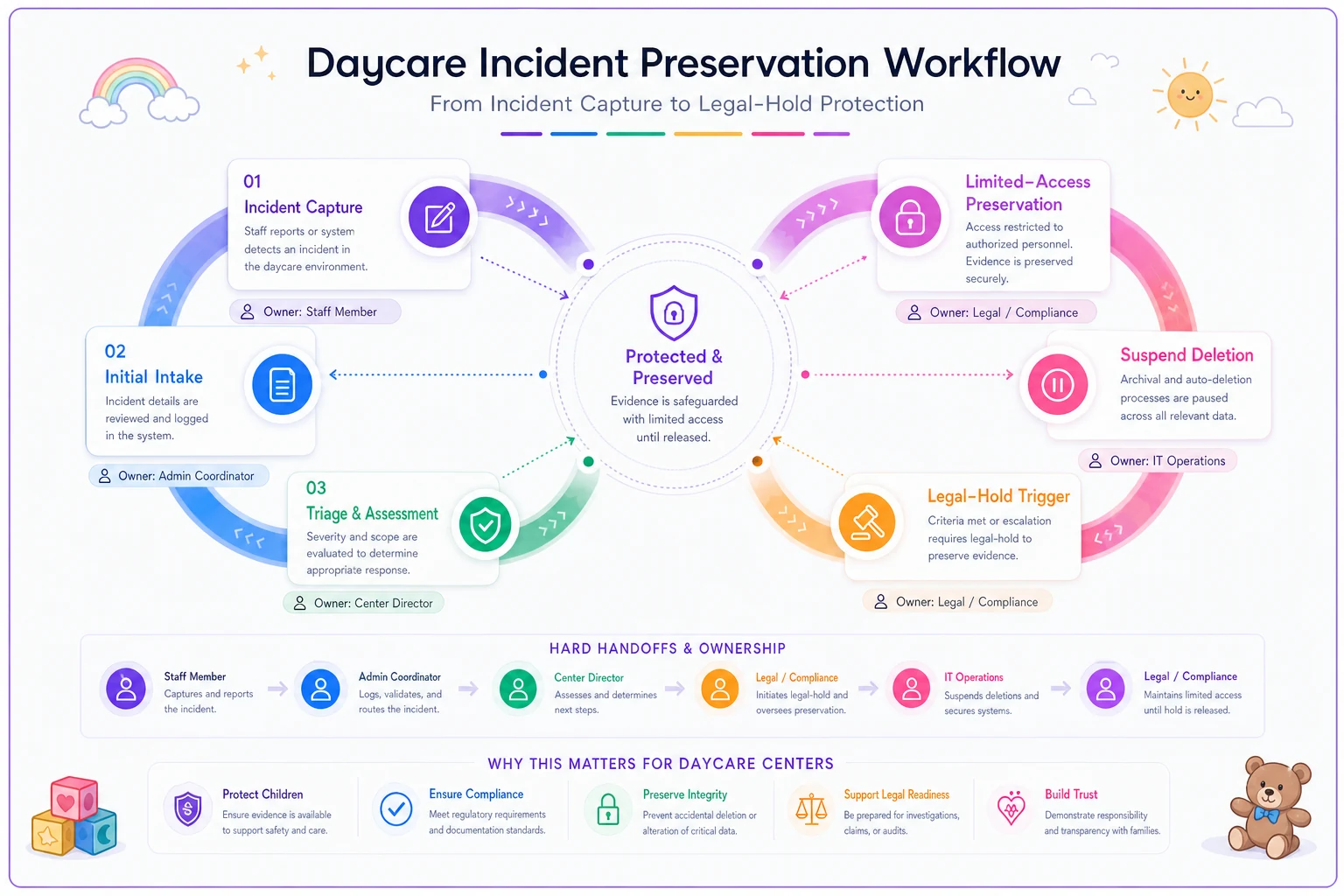
Use this as a quick reference for who does what and when.
Preservation folder templates
When a hold triggers, scrambling to figure out what to collect wastes the exact hours when footage is overwriting. Pre-built folder structures fix this. Create a matter folder the moment a hold starts, using a consistent template so nothing gets missed.
/LEGAL-HOLD/[Matter-ID][Date-opened]/ /01Incident/ original-incident-report.pdf appended-corrections/ witness-statements/ /02Child-Family/ enrollment-contract.pdf medical-allergy-forms/ all-family-communications/ (dated export) /03Staffing/ classroom-roster-that-day.pdf attendance-sign-in-out.pdf ratio-log.pdf involved-staff-file/ credential-training-records/ /04Facility-Media/ surveillance-footage/ (PRIORITY - preserve first) photos/ facility-inspection-records/ /05Chain-of-Custody/ hold-notice.pdf access-log.xlsx owner-decisions-log.pdf
A few things that make this template actually work in practice:
-
Matter-ID, not family name, in the folder title. Keeps the hold organized without turning the folder name itself into something sensitive.
-
The 05 chain-of-custody folder is non-optional. The hold notice, the access log, and the owner's dated decisions are what prove the process was followed. This is the folder most centers forget, and it's also the one that saves you.
-
Dated exports, not live links. Preserve a copy of the communication thread as it existed at that moment, with an export date. A live link can change; a dated export is frozen.
Use Matter-ID, not family name, in the folder title to avoid exposing sensitive info.
The 05 chain-of-custody folder is non-optional. The hold notice, the access log, and the owner's dated decisions are what prove the process was followed. This is the folder most centers forget, and it's also the one that saves you.
Owner escalation responsibilities
The single biggest governance failure is ambiguity about who decides what. During a stressful incident, "I thought the director was handling it" is how footage gets overwritten. Every stage needs one named owner.
| Stage | Primary owner | Backup | Must happen within |
|---|---|---|---|
| Incident capture & submission | Lead teacher / staff on duty | Shift supervisor | End of shift |
| Escalation to owner/director | Shift supervisor | Any admin | Same day for serious incidents |
| Legal-hold decision | Owner (non-delegable) | Designated co-owner | Within 24 hours of escalation |
| Suspend auto-deletion / preserve footage | Admin designated by owner | Owner | Immediately on hold |
| Limited-access lockdown | Owner | Designated admin | Within 24 hours of hold |
| Attorney notification | Owner | — | As owner judges |
The non-delegable one is the legal-hold decision. That call should sit with the owner, every time. It's not a filing task; it's a judgment about risk, and it determines whether your records survive. Delegating it to whoever's available on a Friday is how centers end up explaining to a lawyer why the hold started three weeks too late.
For centers with multiple sites, each location needs a clear escalation line up to a single owner-level decision maker. You do not want two directors at two sites making inconsistent hold decisions on the same matter. This ties directly into the kind of role-mapped, auditable compliance workflow you should already be running for everyday compliance — the legal-hold path is a high-stakes branch off that same tree.
A real scenario
A mid-sized center, roughly 90 kids across six classrooms. A toddler takes a fall on the playground, gets a bump, and goes home with an ice pack. The family seems fine. The incident report gets filed and life moves on.
Three weeks later, a demand letter arrives. The family's attorney wants the incident report, surveillance footage, the staffing records for that classroom, and the playground inspection logs.
Without a hold process, here's where it falls apart: the camera system overwrites footage every 21 days. The incident was day one; the letter arrived day 22. Footage gone. The center had also run an auto-archive that moved the previous month's attendance into a compressed backup nobody could quickly open.
At this particular center — because the owner had a hold trigger tied to "any injury requiring treatment beyond basic first aid" — the footage was flagged for preservation on day two. The ice pack counted. The owner copied that day's footage into a matter folder, locked the incident report, and pulled the staffing records that same week. When the letter came, assembling the response took a couple hours instead of a frantic week, and nothing critical was missing.
The cost difference wasn't just the footage. It was the posture. A center that produces a clean, complete, dated preservation package looks organized and defensible. A center that says "the footage looped, sorry" looks careless at best. One of those settles cheap; the other doesn't.
Owner-level audit checklist for litigation readiness
Run this quarterly, not just when something happens. The whole point of readiness is that the system already works before you need it.
-
[ ] Do we know exactly what auto-deletion/retention rules are active in our software, and the exact timeframes?
-
[ ] Do we know how long our surveillance footage lasts before it overwrites? (Write the number down.)
-
[ ] Are incident records immutable after submission, with corrections appended rather than edited?
-
[ ] Is there a written list of legal-hold triggers that staff and supervisors actually know?
-
[ ] Is there a named owner for the hold decision, and a named backup?
-
[ ] Can we produce a complete access log for any sensitive record?
-
[ ] Do we have a preservation folder template ready to copy, not something we'd build from scratch under pressure?
-
[ ] Have we tested a mock hold — pick a past incident and see how fast we could assemble everything?
-
[ ] Are staff files, credential records, and daily staffing logs retrievable by date and classroom?
-
[ ] Is there a clear line from any site up to a single owner-level decision maker?
If you can't check the mock-hold box, do that first. Nothing reveals gaps faster than actually trying to assemble a package for a real past incident and discovering half of it already rolled off.
When a formal hold process is overkill — and when it isn't
A brand-new home-based center with 8 kids and a single camera probably doesn't need a six-folder template and a chain-of-custody log. At that scale, the owner is the whole governance system, and a simple rule — "if anything serious happens, I immediately copy the footage and freeze the records" — covers most of it.
The threshold where this becomes genuinely necessary is around the point where you are no longer personally present for every incident. Once you have multiple classrooms, shift supervisors, and staff filing reports you didn't witness, the gap between "something happened" and "you found out" grows — and that gap is exactly where records get lost. Multi-site operators have no choice; the process is the only thing keeping decisions consistent across locations.
Who should not treat this as optional: any center that has already had a licensing complaint, any center in a state with aggressive mandatory reporting rules, and any center where staff turnover means the person who filed a report may be gone before the matter resolves.
Where software helps — and where it doesn't
Good center management software makes most of this dramatically easier, mainly by removing the "someone has to remember" failure points. The genuinely useful features are unglamorous: immutable record timestamps, configurable retention rules you can actually see and pause, complete audit logs of who accessed what, and dated exports of communication threads. AI-assisted platforms can also flag when an incident report contains trigger language — words like "liable" or "injury requiring treatment" — and route it to the owner automatically instead of waiting for someone to notice.
Software doesn't make the legal-hold decision for you, and it shouldn't. The judgment about whether an incident could become litigation is yours. What the right platform can do is make sure that once you decide, nothing routine quietly undoes that decision — no purge job, no helpful edit, no overwritten footage. The tool enforces the freeze; you make the call.
If you're building out your broader documentation and evidence practices, the same discipline that powers an evidence-capture runbook for accreditation carries straight into litigation readiness. Centers that are good at capturing clean, dated, immutable evidence for one purpose tend to be good at it for both.
The real takeaway
Records governance for legal hold isn't about being paranoid or lawyered-up. It's about recognizing that your center's everyday instinct — tidy up, archive, move on — is exactly the wrong instinct in the first few days after a serious incident. The whole runbook exists to install the opposite reflex at the right moment, assign it to the right person, and make sure it survives contact with a busy Friday afternoon.
Build the triggers, name the owners, prep the folders, and run one mock hold. Do that, and the day a demand letter shows up, you're spending a couple hours assembling a clean package instead of a week explaining what you can't find.
Build the triggers, name the owners, prep the folders, and run one mock hold. Do that, and the day a demand letter shows up, you're spending a couple hours assembling a clean package instead of a week explaining what you can't find.
Ready to transform your daycare operations?
Join hundreds of daycare centers using Carexly to save time, improve communication, and enhance child care quality.