

Most centers treat occupancy as something they check — a number the director glances at Monday morning, frowns about, and promises to "work on." That passive relationship is exactly why occupancy drifts. By the time an infant room has been sitting at 60% for three weeks straight, you've already eaten weeks of payroll against revenue that never showed up.
The centers that hold steady occupancy don't have better luck or a nicer neighborhood. They run occupancy the way an HVAC system runs temperature: a target, constant measurement, and automatic corrections that kick in before the room gets too hot or too cold. That's what a closed-loop system actually means here. Inputs feed a target, deviation from that target triggers a specific action, and the result feeds back into the next measurement. No guessing, no "let's see how next month looks."
This article lays out how to build a daycare occupancy optimization system that behaves like control engineering — the data inputs it needs, the thresholds that trigger decisions, the weekly ritual that keeps it honest, and the decision matrices that tell you when to run an offer versus when to tighten deposit enforcement.
The loop, in plain terms
A control loop has four parts, and occupancy maps onto them pretty cleanly:
-
Setpoint — your target occupancy per room (not center-wide; room-level, because ratios and revenue live at the room level).
-
Sensor — the data you actually collect
enrolled count, confirmed starts, planned exits, waitlist depth by age band.
-
Controller — the rules that compare actual vs. setpoint and decide what to do.
-
Actuator — the lever you pull
an offer, a deposit enforcement, a staffing adjustment, a waitlist push.
The reason most centers never get this working isn't the math. It's that the four parts live in different places. The enrolled count is in the management software, the planned exits are in a director's head, the waitlist is on a clipboard or a spreadsheet nobody fully trusts, and the "decision" happens in a hallway conversation with no record. The loop is broken before it starts because the signal never reaches the controller.
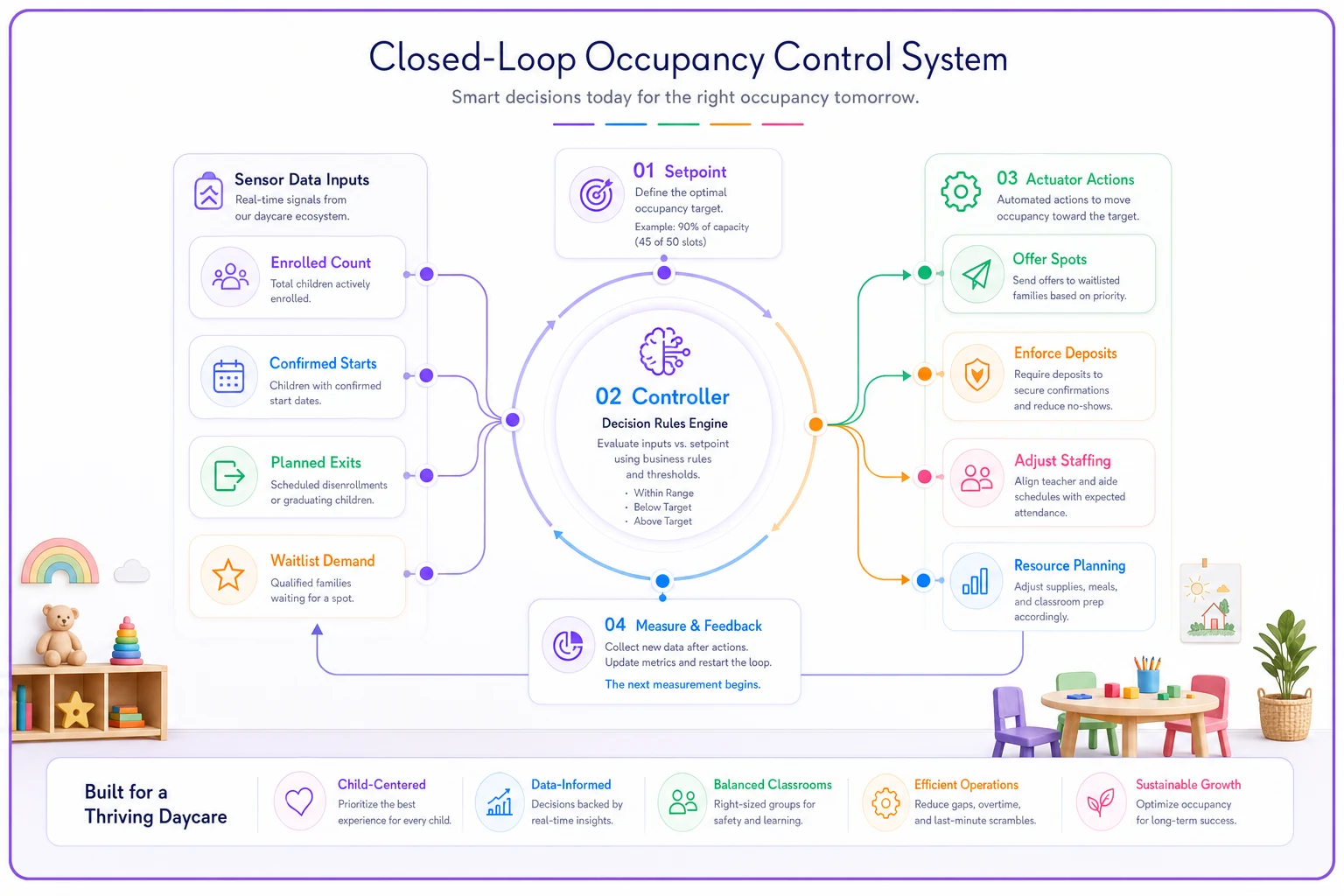
The diagram helps visualize how setpoint, sensor, controller, and actuator connect in a weekly loop.
The number itself is rarely the problem. The latency is. A room doesn't collapse overnight — it leaks. Two families give notice, one start date slips, a tour no-shows. Each event is small. Strung together over three weeks with nobody connecting the dots, they become a 25% occupancy hole that takes a quarter to refill.
Setpoints: why room-level targets beat a center average
A center running at 88% overall sounds healthy. Then you open the rooms and find the toddler room jammed at 100% with a waitlist, the preschool room comfortable at 92%, and the infant room limping at 55%. The average hid a bleeding wound.
Eliminate administrative bottlenecks.
Carexly helps you manage enrollments, attendance, and staff schedules effortlessly.
- Streamlined child enrollment
- Automated parent notifications
- Staff shift and activity scheduling
No credit card required
Infant rooms are where this matters most, because infant ratios are the most expensive to staff. An infant room at 55% occupancy is often still fully staffed — you can't send a teacher home when you have five babies and a 1:4 ratio means you need two adults regardless. So that room isn't just under-earning, it's actively subsidizing itself with payroll you're committed to no matter what.
Set your target per room and define it in two layers:
-
Green zone — the occupancy band where the room is profitable and ratios are efficient (often 90%+ for preschool, though it varies by your pricing and ratio rules).
-
Yellow/red thresholds — the point where deviation triggers action.
If you haven't set room-level targets tied to what each seat actually earns, your thresholds are arbitrary. This is where your pricing structure feeds directly into the loop — the work in childcare tuition pricing that protects occupancy and revenue is the foundation for knowing what a filled seat is worth versus an empty one, and therefore how aggressively to defend it.
The data inputs that actually matter
You don't need forty metrics. You need the handful that predict which direction the loop is heading. A room's current occupancy is a lagging number — it tells you where you've been. The leading signals are what let you act early.
| Input | What it tells you | Why it's a leading signal |
|---|---|---|
| Confirmed starts (next 30/60 days) | Incoming fill by room | Lets you see a surge or gap before it lands |
| Notices given / planned exits | Outgoing seats | The single most-missed input; usually lives in someone's memory |
| Waitlist depth by age band | Replacement capacity | A full room with no waitlist is more fragile than an 85% room with ten families waiting |
| Tour-to-enroll conversion | Funnel health | Falling conversion predicts future gaps even when current occupancy looks fine |
| Deposit / paperwork completion rate | Start reliability | Confirmed starts without deposits slip or vanish |
The exits input deserves a hard rule: a notice isn't real until it's logged. The most common failure pattern is a parent mentioning "we're thinking about kindergarten prep next fall" to a teacher, and nobody records it anywhere. Three of those casual mentions are a planned 15% drop in your pre-K room that your system never saw coming.
Waitlist depth is the input most centers under-use. A waitlist isn't a vanity list — it's your replacement inventory, and it only functions if it's scored and ready to move. The scoring discipline in triage rubrics that convert waitlists faster is what turns a static list into an actuator you can actually pull on demand.
KPI thresholds and the decision matrix
Thresholds without pre-decided actions are just alarms nobody responds to. The whole point is that crossing a threshold triggers a specific, predetermined response — not a meeting to decide what to do.
| Room status | Occupancy band | Waitlist depth | Triggered action |
|---|---|---|---|
| Green | ≥ 90% | Any | Hold. Enforce deposits strictly. No discounts. |
| Soft yellow | 80–89% | Deep (5+ ready) | Pull from waitlist. No offers yet. |
| Soft yellow | 80–89% | Thin (0–2) | Push tours, tighten funnel. Prep offer, don't launch. |
| Red | < 80% | Thin | Launch targeted offer + accelerate waitlist outreach |
| Red + trend down | < 80% and falling 2+ weeks | Any | Offer + staffing review for the room |
The thing most owners miss: offers and deposit enforcement are opposite ends of the same dial, and you should rarely use both at once. When a room is green with a waitlist, you enforce deposits hard because demand protects you — a family that flakes is immediately replaced. When a room is red and thin, you loosen slightly to fill seats, because an empty seat earns nothing and a discounted seat earns most of something.
The mistake is running a center-wide "fall promotion" when only one room is soft. You just handed a discount to families in your two full rooms for no reason, training them to expect it. Offers should be surgical — one room, one age band, time-boxed.
When to run an offer vs. when to enforce deposits
Run an offer when:
-
A specific room is red and the waitlist for that age band is thin
-
You have 30–60 days of visibility into the gap (enough time for an offer to actually fill it)
-
The seat earns meaningfully more filled-at-discount than empty
Enforce deposits and hold firm when:
-
The room is green or has a deep waitlist
-
Slippage is your problem, not demand (families confirming then not starting)
-
You're seeing deposit-free "confirmed" starts quietly disappear
Do NOT run a broad offer when:
-
Only the center average looks soft but individual rooms are fine
-
You haven't fixed a funnel problem — discounting a leaky funnel just loses money faster
-
Your gap is caused by staffing constraints you haven't resolved
That last point matters more than people think. A room can show as "available" on paper while you physically can't open the seats because you're short a qualified teacher. Treating that as an occupancy problem and running an offer is a category error — it's a scheduling problem, and the fixes live in ratio-based shift templates for coverage and utilization.
The weekly reconciliation ritual
The loop only closes if someone sits down every week and compares what the system predicted against what actually happened. This is the ritual that separates centers that drift from centers that hold.
It should take 30–45 minutes, same day each week, same person (usually the director, with the owner reviewing monthly). The agenda:
-
Pull room-level occupancy — actual enrolled vs. setpoint for every room.
-
Reconcile movement — list every add and drop since last week. For each drop
was it predicted? If not, why did you miss it?
-
Update the forward view — confirmed starts, new notices, waitlist changes by age band.
-
Check threshold status — which rooms crossed into yellow or red?
-
Fire the matrix — for every room that crossed a threshold, execute the predetermined action. Log it.
-
Review last week's actions — did the offer or the waitlist push actually move the number?
Step 6 is the part everyone skips, and it's the part that makes it a closed loop. If you ran an offer on the infant room two weeks ago and occupancy didn't budge, that's data. Maybe the offer was weak, maybe the gap was a staffing problem in disguise, maybe your waitlist for that age band is genuinely empty and you have a top-of-funnel problem. Without reviewing outcomes, you'll run the same ineffective offer again next quarter.
Pro-tip: Log outcomes immediately and timestamp decisions so you can trace what actually moved the number.
The reconciliation also catches the data disagreements that quietly poison the whole system — when the software says 14 enrolled, the attendance sheet says 12, and the billing system is invoicing 15. If those three never get reconciled, every downstream decision is built on sand.
A worked reconciliation example
Take a mid-size center, four rooms, roughly 70 licensed capacity. Here's a Monday reconciliation that caught a problem early.
The infant room is set at a green target of 90% (14 of 16 seats). Monday's pull shows it at 11 enrolled — about 69%, firmly red. Last week it showed 13.
Working the movement: one family gave notice (logged, expected — baby turning transition age). But a second drop wasn't predicted. A confirmed start for last Monday never showed. Pulling the record: the family "confirmed" verbally but never paid the deposit or returned paperwork. Classic phantom start.
Forward view: two confirmed starts in the next 30 days, both with deposits paid. Waitlist for infants: thin — two families, one not ready until spring.
Matrix says: red room, thin waitlist, trend down two weeks → launch a targeted offer and accelerate outreach to the one waitlist family who's close to ready. But the reconciliation also surfaced the root cause: the phantom start happened because deposits weren't enforced at confirmation. So two actions get logged — run a small infant-room incentive for the near-term gap, and fix the confirmation rule so "confirmed" requires a paid deposit going forward.
Two weeks later the loop is reviewed: the waitlist family started, one offer tour converted, no new phantom starts because the deposit rule held. Infant room back to 13 and climbing. That's the loop working — the correction addressed both the symptom (the gap) and the cause (slippage).
No center-wide panic, no blanket discount, no emergency owner meeting. One soft room got one targeted correction and one process fix.
Mapping occupancy to staffing triggers
Occupancy and staffing are two gauges on the same engine, and the dangerous part is the lag between them. When a room drops, payroll doesn't drop with it — you're still paying for ratio coverage on near-empty rooms. When a room fills fast, you may suddenly be out of ratio and scrambling to cover.
| Room occupancy change | Staffing trigger |
|---|---|
| Drops below 70% for 2+ weeks | Review whether a float can cover; evaluate combining age-eligible rooms during low-attendance hours |
| Climbs toward 95%+ | Pre-schedule additional qualified coverage before the next start lands |
| Confirmed starts will cross a ratio line next month | Begin hiring/credential check now — fill-time is weeks, not days |
| Sustained red with no recovery path | Escalate to owner: is this a seasonal dip or a structural problem requiring a room restructure? |
The planning side of this — turning occupancy forecasts into payroll you can actually budget for — is covered in depth in occupancy-driven financial forecasts with staffing triggers. The occupancy loop feeds that forecast; the forecast tells you whether a soft room is a cash-flow emergency or a manageable dip.
Where the system breaks as you grow
A single-site director can almost hold this loop in their head. Two sites, and it starts to collapse — not because the work doubles, but because the coordination breaks. Two directors reconciling on different days, defining "confirmed" differently, running offers without the owner seeing both at once. One site discounts while the other holds firm, and families compare notes.
-
Inconsistent setpoints — each site sets its own targets, so "occupancy" means different things across locations.
-
Uncoordinated offers — promotions collide, train families to wait for deals, erode pricing.
-
Lost exit signals — notices live in local memory, never aggregating into a portfolio view.
-
Waitlist silos — a family that fits an open seat at site B sits unused on site A's list.
This is exactly where spreadsheets stop being enough and a central management platform earns its place — not as a magic fix, but as the shared sensor and controller so every site measures the same way, logs decisions in one place, and the owner sees the whole loop instead of four disconnected ones. The value isn't the dashboard; it's that the loop finally stays closed across locations instead of breaking at every handoff.
Downloadable templates to start the loop
You can build the first version of this in a spreadsheet before you need any software. A workable starter set:
-
Room-level occupancy dashboard — one row per room
capacity, current enrolled, setpoint, green/yellow/red status (conditional formatting on the band), waitlist depth.
-
Weekly reconciliation log — adds, drops, predicted vs. actual, action fired, outcome reviewed.
-
Decision matrix / trigger table — the occupancy-band-to-action grid above, adapted to your ratios.
-
Staffing trigger table — occupancy change mapped to the coverage response.
Build them, then run the Monday ritual against them for a month. You'll find your real failure points fast — usually unlogged exits and phantom starts.
Who should NOT bother with this
If you're running a single small room near capacity with a waitlist that never empties, a full control loop is overkill. Glancing at the number weekly is genuinely enough. The loop earns its keep when you have multiple rooms with different age bands, seasonal churn, or more than one site. Complexity is what the system manages; without complexity, you're building machinery for a problem you don't have.
And if your occupancy problem is really a staffing-or-credential problem wearing an occupancy costume, don't start here. Fix the coverage first. A control loop will faithfully tell you to fill seats you can't legally open, and that frustration will make you abandon the whole system.
The point of closing the loop
Occupancy drifts because the signal never reaches the person who can act on it in time. The enrolled count lives in one place, exits in someone's memory, the waitlist on a clipboard, and the decision in a hallway. A closed-loop system isn't about having a fancier number — it's about connecting those four pieces so that a soft room triggers a specific correction this week, not a crisis next quarter. Set your room-level targets. Collect the leading signals, not just the lagging count. Pre-decide your actions so crossing a threshold fires a response instead of scheduling a meeting. Run the reconciliation every week and actually review whether last week's correction worked. Do that consistently and occupancy stops being the thing you worry about Monday morning and becomes the thing that quietly holds steady while you run the rest of the center.
Ready to transform your daycare operations?
Join hundreds of daycare centers using Carexly to save time, improve communication, and enhance child care quality.